
Tech


If you’re searching for 9.7.4 Leash CodeHS Answers, you’re likely trying to make a ball follow your mouse while a line remains connected to it. The challenge sounds straightforward, but a small mistake with coordinates, event handlers, or object positioning can stop the program from working correctly.
The Leash exercise introduces important JavaScript graphics concepts, including mouse events, drawing lines, updating objects, and creating interactive movement.
This guide provides a complete example solution, explains how every important part works, and covers the most common errors students encounter. You’ll also learn how to test your program and apply the same techniques to other CodeHS assignments.
What Is the 9.7.4 Leash Exercise in CodeHS?
The 9.7.4 Leash exercise is part of the Drawing Lines lesson in the CodeHS Introduction to Computer Science in JavaScript course.
According to the official CodeHS curriculum, Leash appears as activity 9.7.4 in Lesson 9.7, alongside other line-drawing exercises.
The objective is to create an interactive graphics program in which a circle represents a ball and a line represents its leash.
When the user moves the mouse, the ball follows the cursor, and the movable endpoint of the line follows the ball. The opposite endpoint remains fixed at the center of the canvas.
Quick Facts About the Exercise
| Feature | Details |
|---|---|
| Exercise name | 9.7.4 Leash |
| Platform | CodeHS |
| Programming language | JavaScript |
| Lesson | Drawing Lines |
| Main concept | Event-driven graphics |
| Primary objects | Circle and Line |
| Event handler | mouseMoveMethod() |
| Difficulty | Beginner |
| Expected result | A mouse-controlled ball attached to a line |
Although the program requires relatively little code, completing it correctly demonstrates an understanding of how graphical objects respond to user input.
9.7.4 Leash CodeHS Answers: Complete JavaScript Solution
The following JavaScript example implements the standard Leash behavior using CodeHS graphics methods.
It creates a ball, connects it to a fixed center point, and updates both the ball and the leash when the mouse moves.
Complete Example Code
// Radius of the ball
var BALL_RADIUS = 30;

// Global graphics objects
var ball;
var leash;

function start() {
    // Find the canvas center
    var centerX = getWidth() / 2;
    var centerY = getHeight() / 2;

    // Create the leash
    leash = new Line(
        centerX,
        centerY,
        centerX,
        centerY
    );

    leash.setColor(Color.black);
    add(leash);

    // Create the ball
    ball = new Circle(BALL_RADIUS);
    ball.setPosition(centerX, centerY);
    ball.setColor(Color.blue);
    add(ball);

    // Register mouse movement
    mouseMoveMethod(moveBall);
}

// Update the graphics when the mouse moves
function moveBall(e) {
    var mouseX = e.getX();
    var mouseY = e.getY();

    ball.setPosition(mouseX, mouseY);
    leash.setEndpoint(mouseX, mouseY);
}
This implementation uses methods documented in the official CodeHS JavaScript Graphics Documentation.
The example demonstrates the intended interaction, although students should check their particular assignment instructions for required variable names, constants, colors, or other grading conditions.
What Happens When You Run the Program?
After execution:
-
A blue circle appears at the center of the graphics canvas.
-
A leash is created with both endpoints initially at the center.
-
Moving the mouse changes the position of the circle.
-
The leash extends from the original center to the circle’s new location.
-
The circle and the moving end of the leash remain connected.
The program doesn’t need a continuous timer. It responds whenever CodeHS detects mouse movement.
How the 9.7.4 Leash Code Works Step by Step
Understanding the solution is more useful than memorizing it. Each part demonstrates a JavaScript concept that appears again in interactive games and graphics assignments.
Step 1: Declare the Global Variables
The program begins with three declarations:
var BALL_RADIUS = 30;
var ball;
var leash;
BALL_RADIUS defines the circle’s size, while ball and leash store references to the graphical objects.
The two object variables are declared outside start() because the mouse event function also needs to access them.
Why this matters: If you declare ball using var inside start(), another function cannot access that local variable directly.
Global variables make the objects accessible to both the initialization and movement functions.
Step 2: Calculate the Canvas Center
Next, calculate the center of the graphics area:
var centerX = getWidth() / 2;
var centerY = getHeight() / 2;
The functions getWidth() and getHeight() return the canvas dimensions.
Dividing each value by two determines the center coordinates.
For example, suppose the canvas measures 400 pixels wide and 500 pixels high.
The center would be:
-
X-coordinate: 400 ÷ 2 = 200
-
Y-coordinate: 500 ÷ 2 = 250
Therefore, the leash’s fixed endpoint would be located at (200, 250).
Calculating these values dynamically is better than using fixed coordinates because the program can adapt to different canvas dimensions.
Step 3: Create the Leash Using a Line
The line is created using:
leash = new Line(
    centerX,
    centerY,
    centerX,
    centerY
);
In CodeHS graphics, the Line constructor takes four coordinates:
new Line(x1, y1, x2, y2);The first pair represents the starting point, and the second pair represents the ending point.
Initially, both points are at the center, so the leash has zero length and may not be visible.
When the cursor moves, its endpoint changes and the line becomes visible.
Step 4: Create and Display the Ball
The circle is initialized with:
ball = new Circle(BALL_RADIUS);
ball.setPosition(centerX, centerY);
ball.setColor(Color.blue);
add(ball);
Each method performs a different function.
new Circle(BALL_RADIUS) creates the graphical circle with the specified radius.
setPosition(centerX, centerY) positions its center on the canvas.
setColor(Color.blue) changes its appearance, while add(ball) displays the object.
Notice that the example adds the line before the circle. This drawing order helps keep the ball visually in front of the leash.
Step 5: Register the Mouse Movement Event
The next instruction is:
mouseMoveMethod(moveBall);This tells CodeHS to execute the moveBall function whenever the mouse moves.
An important detail is that the function name appears without parentheses.
Correct:
mouseMoveMethod(moveBall);Incorrect:
mouseMoveMethod(moveBall());Using parentheses attempts to execute the function immediately instead of registering it as an event handler.
The official CodeHS documentation confirms this callback pattern for mouse events.
Step 6: Read the Mouse Coordinates
Inside the movement function, the program retrieves the current cursor position:
function moveBall(e) {
    var mouseX = e.getX();
    var mouseY = e.getY();
}
The parameter e represents the mouse event.
Its methods provide the location of the cursor:
-
e.getX()returns the horizontal coordinate. -
e.getY()returns the vertical coordinate.
For example, if the cursor moves to (150, 300), these methods return 150 and 300.
The program can then use those values to reposition graphical objects.
Step 7: Move the Ball and Update the Leash
The final two statements create the interactive effect:
ball.setPosition(mouseX, mouseY);
leash.setEndpoint(mouseX, mouseY);
The first statement moves the ball to the cursor location.
The second changes the leash’s endpoint to that same location without changing its starting point.
Because both objects use identical coordinates, the ball and leash remain connected.
That is the essential logic behind the Leash exercise.
Understanding the Most Important CodeHS Graphics Methods
Several methods work together to produce the completed program.
| Method | Purpose | Application |
|---|---|---|
Circle(radius) |
Creates a circular object | Represents the ball |
Line(x1,y1,x2,y2) |
Creates a line | Represents the leash |
setPosition(x,y) |
Updates an object’s position | Moves the ball |
setEndpoint(x,y) |
Updates the line’s ending point | Extends the leash |
mouseMoveMethod(fn) |
Registers a mouse movement handler | Enables interaction |
getWidth() |
Returns canvas width | Calculates center X |
getHeight() |
Returns canvas height | Calculates center Y |
e.getX() |
Retrieves cursor X | Tracks horizontal movement |
e.getY() |
Retrieves cursor Y | Tracks vertical movement |
add(object) |
Displays a graphics object | Adds the ball and leash |
One particularly important distinction is between setPosition() and setEndpoint() when working with a line.
In CodeHS, the line’s setPosition() method changes its starting point, while setEndpoint() changes its ending point.

For this exercise, changing the ending point preserves the fixed center anchor.
Why Event-Driven Programming Matters in Leash
The 9.7.4 Leash activity is an introduction to event-driven programming.
Traditional sequential programs execute instructions in order. Interactive programs, however, often need to respond to actions that happen after initialization.
These actions are called events.
Examples include mouse movements, clicks, keyboard presses, and dragging.
In the Leash program, start() creates the objects and registers the event handler. After that, CodeHS calls the handler when a mouse movement occurs.
Mouse Events vs. Timers
A common beginner mistake is assuming that mouse movement requires a timer.
These are two different approaches.
| Mouse events | Timers |
|---|---|
| Run when mouse activity occurs | Run according to a time interval |
| Useful for cursor tracking | Useful for automatic animation |
| Depend on user interaction | Can run without user interaction |
Use mouseMoveMethod() |
Use a timer function |
| Appropriate for Leash | Unnecessary for basic Leash behavior |
For an interactive ball following the mouse, an event handler is the more direct solution.
Common 9.7.4 Leash CodeHS Errors and How to Fix Them
Even when the logic is correct, small implementation mistakes can create unexpected results.
Here are the problems worth checking first.
1. The Ball Does Not Follow the Mouse
Possible cause: The mouse movement handler hasn’t been registered correctly.
Check that your start() function contains:
mouseMoveMethod(moveBall);Also verify that the moveBall function exists and accepts the event parameter.
If the callback name doesn’t match the declared function, the program cannot handle movement as intended.
2. The Leash Does Not Follow the Ball
The ball might move correctly while the line remains fixed.
This usually happens when the event handler updates only the circle:
ball.setPosition(mouseX, mouseY);You must also update the leash:
leash.setEndpoint(mouseX, mouseY);Both statements belong inside the same mouse movement function.
3. The Program Creates Multiple Lines
Some students place the new Line() constructor inside their mouse movement handler.
This may create a new line every time the cursor moves, leaving unwanted lines across the canvas.
The better approach is to create the line once in start() and update that existing line whenever the mouse moves.
It is a basic but valuable programming principle: modify existing objects when you want continuous movement rather than repeatedly creating replacements.
4. The Program Shows an Undefined Variable Error
Consider the following code:
function start() {
    var ball = new Circle(30);
}
If another function tries to access ball, the reference is unavailable because it was declared locally.
To fix the problem, declare the variable outside both functions:
var ball;

function start() {
    ball = new Circle(30);
}
Now other functions in the same program can reference the object.
5. The Leash Moves Away From the Center
If you accidentally call:
leash.setPosition(mouseX, mouseY);you will move the line’s starting point rather than its endpoint.
For the intended Leash behavior, use:
leash.setEndpoint(mouseX, mouseY);The difference is small in code but significant in the visual result.
6. The Line Appears Over the Ball
The order in which graphics objects are added affects their visual stacking.
If the line is added after the circle, it may appear over the circle.
For a cleaner result, create and add the leash first, then add the ball.
This allows the ball to appear in front of the line, making the attachment look more natural.
How to Test Your Leash Program Correctly
Running the program without errors doesn’t necessarily mean the exercise works properly.
A useful test checks both initial positioning and interactive behavior.
| Test | Action | Expected result |
|---|---|---|
| Initial display | Run the program | Ball appears in the center |
| Horizontal movement | Move mouse left and right | Ball and line endpoint follow |
| Vertical movement | Move mouse up and down | Both update vertically |
| Diagonal movement | Move mouse diagonally | Leash remains connected |
| Anchor stability | Move mouse across canvas | Starting point stays centered |
| Repeated movement | Move cursor rapidly | Existing objects update without leaving extra lines |
Test With Actual Coordinates
Suppose your canvas is 400 pixels wide and 500 pixels tall.
The fixed anchor is (200, 250).
If the mouse moves to (100, 100), the expected result is:
-
Leash starting point:
(200, 250) -
Leash ending point:
(100, 100) -
Ball center:
(100, 100)
Move the mouse again to (350, 400).
The starting point should remain (200, 250), while the line endpoint and ball center both change to (350, 400).
If these coordinate relationships remain correct, the central interaction is working.
Advanced Improvements You Can Try
Once you’ve completed the basic exercise, you can use the same concepts to build more advanced interactions.
These additions are useful for practice, although they are not necessarily part of the original assignment.
Change the Ball’s Color
To experiment with styling, change:
ball.setColor(Color.blue);to:
ball.setColor(Color.red);This doesn’t alter the movement logic. It simply changes the circle’s appearance.
Change the Ball’s Size
You can adjust the radius:
var BALL_RADIUS = 20;A smaller radius produces a smaller ball.
Experimenting with different sizes helps explain how an object’s graphical dimensions differ from its position.
Prevent the Ball From Moving Beyond the Canvas Edge
An additional challenge is keeping the entire circle visible when the cursor reaches an edge.
You can constrain the ball’s position using its radius:
function moveBall(e) {
    var x = e.getX();
    var y = e.getY();

    x = Math.max(
        BALL_RADIUS,
        Math.min(x, getWidth() - BALL_RADIUS)
    );

    y = Math.max(
        BALL_RADIUS,
        Math.min(y, getHeight() - BALL_RADIUS)
    );

    ball.setPosition(x, y);
    leash.setEndpoint(x, y);
}
This version prevents the ball’s center from moving so close to an edge that part of the circle extends outside the canvas, assuming the canvas is large enough for the circle.
It also keeps the leash connected to the ball’s constrained position rather than the original mouse location.
This illustrates a broader programming technique called boundary checking, commonly used in games and graphical interfaces.
Skills You Learn From the CodeHS Leash Exercise
The assignment teaches more than how to draw a line.
Its underlying techniques are useful across many areas of software development.
Understanding Coordinates
Every graphical object has a position represented by coordinates.
Learning how X and Y values work prepares students for more advanced graphics, simulations, and game development.
Working With Functions
The exercise separates initialization and interaction into different functions.
This structure makes the program easier to understand, debug, and modify.
Managing Object State
Instead of creating a new circle and line for every movement, the program updates objects already stored in memory.
This introduces the idea of maintaining and changing an object’s state.
Building Interactive Applications
The mouse movement callback demonstrates how programs can react to user activity.
The same principle appears in drawing applications, interactive maps, browser interfaces, and simple games.
Frequently Asked Questions About 9.7.4 Leash CodeHS Answers
What is the correct answer to 9.7.4 Leash CodeHS?
The standard approach is to create a circle and a line, register a mouse movement callback, and update the circle’s position and line’s ending point using the cursor coordinates. The line’s starting point remains fixed at the canvas center.
What programming language is used in 9.7.4 Leash?
The exercise uses JavaScript with CodeHS’s graphics library. It introduces objects, functions, mouse events, and coordinate-based positioning.
Why isn’t my Leash code working?
The most common causes include incorrectly registered mouse events, variables with the wrong scope, missing add() statements, and updating the wrong endpoint of the line.
Check these areas before rewriting the entire program.
What does mouseMoveMethod() do in CodeHS?
mouseMoveMethod() registers a function that CodeHS executes when the mouse moves over the graphics canvas.
The registered function receives an event object containing information such as the cursor’s X and Y coordinates.
Why is the leash invisible when the program starts?
If both endpoints are initially positioned at the center, the line has zero length.
The leash becomes visible when the cursor moves and the program updates its endpoint.
Can I use a timer instead of mouseMoveMethod()?
Timers are useful for automatic animation, but a mouse movement handler is better suited to tracking the cursor directly.
Using mouseMoveMethod() also follows the event-driven structure taught in the exercise.
Why does my program leave multiple lines on the canvas?
You’re probably creating new lines inside the mouse movement function.
Create the line once during initialization and change its endpoint with setEndpoint() whenever the cursor moves.
Is the same solution valid for every CodeHS course?
Not necessarily. CodeHS courses and versions can use different exercise numbers or grading requirements.
Always compare the example against the exact instructions in your classroom assignment, particularly any required constants, object properties, or function names.
Conclusion
The 9.7.4 Leash CodeHS Answers exercise demonstrates how JavaScript graphics objects can respond to mouse movement while maintaining a connection between a fixed point and a moving object.
The essential solution is to create the ball and leash once, register a mouse movement handler, and update both the ball’s position and the line’s endpoint using the same coordinates.
Understanding variable scope, event callbacks, object positioning, and drawing order will help you avoid common mistakes and complete similar CodeHS exercises more confidently.

If you’ve come across imageflings.com while browsing the internet, you may be wondering what the website offers, whether it’s still active, and if it’s safe to visit. Finding reliable information about lesser-known domains can be challenging, especially when their purpose, ownership, or availability isn’t immediately clear.
This guide examines what can currently be verified about imageflings.com, how to investigate its website status, and what to consider before interacting with unfamiliar online platforms.
Whether you discovered the domain through a search result, an external link, or a direct recommendation, understanding its credibility can help you make an informed decision.
What Is imageflings.com?
imageflings.com is an internet domain whose current purpose and operating status are not clearly established through publicly accessible information.
Although its name might suggest a connection to digital images, photography, or visual content, a domain name alone cannot reliably establish what a website actually provides.
A publicly indexed third-party listing associated with the subdomain view.imageflings.com has indicated that the domain may be available for sale. However, that listing does not independently confirm the present ownership, functionality, or availability of the main website.
An attempt to retrieve the primary domain also returned an HTTP 403 Forbidden response. This means the requested content could not be accessed through that retrieval method, but it does not necessarily mean the website is offline or unsafe.
Quick Facts About imageflings.com
| Feature | Available information |
|---|---|
| Domain | imageflings.com |
| Website category | Not independently confirmed |
| Current operational status | Not conclusively verified |
| Public homepage accessibility | Automated retrieval returned HTTP 403 |
| Domain ownership | Not verified |
| Registration requirements | Unknown |
| Subscription or pricing | Not verified |
| Security reputation | Insufficient evidence for a definitive rating |
| Associated subdomain | view.imageflings.com |
| Possible domain sale status | Suggested by a third-party listing, not confirmed |
The most important distinction is between a domain’s existence and its actual services. A registered domain can be active, parked, redirected, restricted, or undergoing redevelopment.
Until the website’s current content and operator can be independently verified, specific claims about its features or services should be treated cautiously.
Is imageflings.com Currently Working?
A website can appear unavailable for several reasons, and not all indicate a permanent shutdown.
For imageflings.com, the available information does not establish whether ordinary visitors can consistently access a functioning service.
Possible Reasons the Website May Not Open
Several technical or administrative conditions can affect access:
-
Server restrictions: The website may reject certain automated requests or visitor connections.
-
Temporary maintenance: The domain could be undergoing technical updates.
-
Domain parking: An owner may retain the domain without hosting an active application.
-
Access limitations: Geographic restrictions, firewalls, or anti-bot systems may prevent access.
-
DNS problems: Domain configuration errors can interrupt connections.
-
Ownership changes: A domain may be transferred, sold, or repurposed.
A 403 Forbidden response specifically indicates that the server or an intermediary refused access to the requested resource. It should not automatically be interpreted as proof of malware, a scam, or permanent closure.
How to Check Whether imageflings.com Is Accessible
If you want to investigate its current status, follow these steps:
-
Enter the exact address,
https://imageflings.com, into a modern browser. -
Examine the address bar for unexpected spelling changes or redirects.
-
Check whether the website loads a normal page, an error, or a domain-sale notice.
-
Use a reputable website-status checker to determine whether other locations can reach the domain.
-
If access fails, try again later rather than repeatedly following unfamiliar redirect links.
Avoid entering account credentials or payment information merely to test whether a website works.
Is imageflings.com Safe to Use?
There is currently insufficient independently verified evidence to classify imageflings.com as either trustworthy or malicious.
One third-party checker has displayed positive indicators for an associated subdomain, including HTTPS support and the absence of certain detected warnings. However, the checker also acknowledges that its assessment is incomplete.
These findings are limited. They do not verify the website’s owner, content moderation practices, data handling, or financial reliability.
1. Examine HTTPS and Connection Security
HTTPS helps encrypt information transmitted between your browser and a website.
When accessing imageflings.com, check whether the browser establishes a valid HTTPS connection and whether the certificate corresponds to the domain you’re visiting.
However, HTTPS does not guarantee that a website is legitimate. Fraudulent websites can also obtain valid security certificates.
2. Investigate Domain Ownership
Domain registration information can sometimes reveal useful administrative details.
You can search for imageflings.com through an ICANN registration lookup to examine publicly available registration records.
Consider checking:
-
Domain registration and expiration dates
-
The current registrar
-
Available registration-status information
-
Recent changes, where disclosed
-
Whether registrant details are publicly available or privacy-protected
Privacy protection alone is not suspicious. Many legitimate website owners use it to reduce spam and unwanted contact.
The key is to evaluate several indicators together rather than treating any single detail as proof of credibility.
3. Look for Transparent Website Policies
Before creating an account or submitting personal information, inspect the website for essential documentation.
Useful indicators include a clear privacy policy, understandable terms of service, identifiable contact information, and an explanation of how user information is collected or retained.
If the website requests payment, the terms should also explain pricing, billing cycles, cancellation procedures, and refund eligibility.
Missing documentation does not automatically establish fraud, but it creates uncertainty that visitors should consider before proceeding.
4. Check Independent Security Reports
Security reputation services can provide additional context about unfamiliar domains.
Useful resources include:
These services assess different signals, so their results may not always agree.
For example, a domain could have a clean malware scan but still lack clear ownership information or transparent business practices.
A clean security result is evidence of limited detected risk, not a guarantee that every activity on the website is safe.
How to Evaluate imageflings.com Before Using It
When assessing an unfamiliar website, a structured review is more useful than relying on first impressions.
The following framework can help determine whether further interaction is appropriate.
Website Evaluation Checklist
| Evaluation area | What to inspect | Why it matters |
|---|---|---|
| Domain identity | Exact spelling and redirects | Helps detect impersonation |
| HTTPS | Valid browser connection | Protects information in transit |
| Ownership | Public registration and operator details | Supports accountability |
| Privacy | Collection and sharing policies | Clarifies how personal data is handled |
| Payments | Pricing, cancellation, and refund terms | Reduces unexpected billing risks |
| Reputation | Independent reports and reviews | Provides outside perspectives |
| Contact details | Working support methods | Helps resolve account problems |
| Downloads | File source and security warnings | Reduces software-related risks |
No single positive result is sufficient to establish complete trust.
A website becomes easier to evaluate when its identity, services, policies, and reputation can be independently corroborated.
Understanding Website Reputation Scores
One common mistake is treating automated trust scores as definitive verdicts.
These scores generally combine technical, historical, and reputation-related signals. Different providers may use different criteria and may update their assessments at different times.
A service might assign a positive score because a domain supports HTTPS and has no known malware detections.
Another might express caution because the domain has limited public information or unusual redirects.
Both assessments can reflect legitimate observations without establishing the complete picture.
Technical Safety vs. Business Trustworthiness
These concepts are related but distinct.
Technical safety concerns whether a website exposes visitors to risks such as malicious downloads, phishing infrastructure, or compromised connections.
Business trustworthiness concerns whether an operator provides accurate information, handles payments fairly, respects privacy, and delivers advertised services.
A website can be technically secure while operating under confusing or unfavorable business terms.
Conversely, an otherwise legitimate organization can experience temporary security problems.
For imageflings.com, there is not enough confirmed information to complete a meaningful assessment of both categories.
What to Do If imageflings.com Redirects You Somewhere Else
A redirect occurs when a website automatically sends visitors to another address.
Redirects are common across the internet and can serve legitimate purposes, such as moving from an old domain to a new one.
However, unfamiliar redirects deserve additional scrutiny.
How to Evaluate a Redirect
Before interacting with a destination page, examine its full domain name.
Pay attention to subtle spelling differences, unexpected country-code extensions, and URLs that imitate familiar brands.
If the destination requests personal information, consider whether the relationship between the original website and the new destination is clearly explained.
A redirect to a domain-sale marketplace, for example, may suggest that the original domain is parked or being advertised for sale.
A redirect to an unrelated login page should be evaluated more carefully.
Warning Signs to Watch For
Exercise additional caution if a website:
-
Repeatedly redirects through unrelated domains.
-
Requests sensitive information without a clear purpose.
-
Claims that your device is infected and demands immediate action.
-
Forces unexpected downloads.
-
Displays fake security warnings.
-
Requires payment before explaining its services.
-
Provides no identifiable operator or support information.
These are general warning signs, not confirmed behaviors of imageflings.com.
Protecting Your Privacy When Visiting Unfamiliar Websites
Privacy deserves particular attention when a website’s purpose and ownership are uncertain.
Even ordinary browsing can expose information such as an IP address, browser characteristics, approximate location, and certain activity data to website operators or their technology providers.
The information collected depends on the website and the visitor’s settings.
Limit the Information You Share
Avoid providing your full name, telephone number, address, identification documents, or financial information until you understand why the information is needed.
If registration becomes necessary, consider using a unique password and an email address appropriate for that account.
Never reuse a password associated with banking, email, or other important services.
Review Browser Permissions
Websites sometimes request access to features such as notifications, cameras, microphones, or location data.
Only grant permissions that are necessary for a function you understand and intend to use.
For an unfamiliar website, denying unnecessary permissions is generally the safer default.
Be Careful With Uploaded Images
If imageflings.com eventually proves to offer image-related functionality, users should examine any upload policy before submitting photographs.
Images can contain more information than the visible subject.
Depending on the file and device, embedded metadata may include creation times, device information, or geographic coordinates.
Before uploading sensitive photographs to any service, consider removing unnecessary metadata and reviewing the platform’s retention, sharing, and deletion policies.
These precautions apply broadly to online image services and do not establish that imageflings.com currently supports uploads.
Common Mistakes People Make When Researching imageflings.com
Several assumptions can lead to unreliable conclusions about an unfamiliar domain.
Mistake 1: Assuming the Name Reveals the Service
The word image in a domain name may suggest photography or visual content.
However, naming conventions are not reliable evidence of current functionality.
Domains can be repurposed, transferred, or used for services unrelated to their original names.
Mistake 2: Trusting a Single Review Website
An automated review can provide useful signals, but it may rely on incomplete or outdated information.
Compare findings across several independent sources and consider when each assessment was performed.
Mistake 3: Confusing an Error Page With a Scam
A 403, 404, or 503 error does not automatically indicate malicious activity.
These status codes have different technical meanings and can occur on legitimate websites.
Investigate the broader context before drawing conclusions.
Mistake 4: Ignoring Redirect Destinations
A visitor might begin at one address and end up on another without noticing.
Always review the final domain before logging in, purchasing anything, or downloading files.
Mistake 5: Treating Domain Age as Proof of Reliability
Older domains sometimes have longer operating histories, but age does not guarantee trustworthiness.
A domain may change ownership or purpose at any time.
Recent activity and transparent operations matter more than age alone.
How imageflings.com Compares With Established Image Platforms
If your interest in imageflings.com relates to uploading, sharing, or storing images, established services offer alternatives with more clearly documented functionality.
This comparison does not assume that imageflings.com provides equivalent features.
| Platform | Main purpose | Common use case |
|---|---|---|
| imageflings.com | Not verified | Requires further investigation |
| Google Photos | Photo storage and organization | Personal photo libraries |
| Flickr | Photography hosting and communities | Sharing photographic work |
| Imgur | Image hosting and sharing | Sharing images through links |
| Adobe Portfolio | Portfolio website creation | Presenting creative work |
| Unsplash | Photography discovery and licensing | Finding images for permitted use |
These platforms address different needs, so their suitability depends on whether you want private storage, public hosting, professional presentation, or licensed image discovery.
Choose According to Your Actual Goal
For personal photo backups, prioritize storage reliability, account security, and recovery options.
For a public photography portfolio, evaluate design control, image presentation, custom-domain support, and content ownership terms.
For image sharing, consider visibility settings, direct-link functionality, moderation policies, and deletion controls.
For licensed images, check the licensing terms for the specific photograph rather than assuming every image on a platform can be reused freely.
Advanced Tips for Investigating an Unfamiliar Domain
When basic website checks produce inconclusive results, several more detailed methods can help.
Examine Historical Website Snapshots
The Internet Archive’s Wayback Machine may contain historical snapshots of a domain.
Enter imageflings.com into the archive search to check whether older versions of the website are available.
Historical snapshots may reveal previous branding, content categories, or site changes.
However, archived pages cannot establish that the same owner or service is operating today.
Inspect Public DNS Information
DNS records connect domain names with the infrastructure used to serve websites and other online services.
A DNS lookup may reveal name servers, IP addresses, and mail-related records.
These details can assist technical investigations, but they rarely identify the actual business operator conclusively.
For example, two unrelated websites can use the same hosting provider or content-delivery network.
Look for Consistent Branding
A legitimate online service often maintains recognizable branding across its website, documentation, support channels, and public communications.
Check whether references to the domain use consistent names, contact details, and explanations of services.
Inconsistencies are reasons to investigate further, not automatic proof of misconduct.
Verify Claims Independently
If a website claims to be affiliated with a recognizable company or platform, look for confirmation on that organization’s official website.
Do not rely exclusively on logos, testimonials, badges, or partnership claims displayed by the unfamiliar domain itself.
Independent verification is particularly important before making payments or providing sensitive personal information.
Frequently Asked Questions About imageflings.com
What is imageflings.com used for?
The present purpose of imageflings.com has not been independently established. Available public information is insufficient to confirm whether it operates an image-hosting platform, another type of service, or no active service at all.
Is imageflings.com a legitimate website?
There is not enough verified information to make a definitive legitimacy assessment. Its ownership, operating policies, and current service offering remain unclear.
Is imageflings.com safe to open?
No conclusive security assessment is available. Before visiting, use established website reputation tools, verify the address, and avoid sharing sensitive information until the website’s credibility is clearer.
Why is imageflings.com not opening?
Possible explanations include server access restrictions, technical maintenance, DNS issues, domain parking, or changes to website operations. An automated attempt to access the main domain returned HTTP 403, but that result alone does not establish the cause.
Is imageflings.com free?
Its pricing and registration requirements have not been verified. Claims about free accounts, premium memberships, or paid features would therefore be speculative.
Does imageflings.com allow image uploads?
There is no sufficiently reliable evidence available to confirm its current upload functionality. The domain’s name should not be treated as proof that an image-upload service exists.
Who owns imageflings.com?
The current owner has not been independently verified for this review. Public registration information may provide additional details, although privacy services can limit what is visible.
Is imageflings.com associated with another website?
No particular commercial affiliation has been confirmed. Similar names, shared infrastructure, or redirects should not automatically be interpreted as evidence of common ownership.
Can I recover an old account on imageflings.com?
Account recovery options cannot be confirmed without verifying that an active account system exists. If you previously registered, consult any legitimate records you retained and avoid submitting credentials to unverified recovery pages.
What should I do if I entered personal information on the site?
If you suspect your information was exposed, change any reused passwords, enable multifactor authentication where possible, and monitor relevant accounts for unusual activity.
If payment information was submitted and you notice an unauthorized transaction, contact your card issuer or payment provider promptly.
Final Verdict: What You Should Know About imageflings.com
imageflings.com is a domain with limited publicly verifiable information about its current operation, ownership, and services.
The available evidence includes a third-party listing suggesting that an associated subdomain may be connected to a domain offered for sale, along with an automated access attempt that returned a 403 Forbidden response. Neither finding establishes that the website is malicious, trustworthy, or permanently inactive.
For anyone considering visiting imageflings.com, the most practical approach is to verify the website’s current status, inspect its actual destination, consult independent security resources, and avoid submitting sensitive information until its purpose and operator are clear.
A credible website should offer more than an accessible address. It should provide understandable services, transparent policies, and enough independently verifiable information for visitors to make informed decisions.
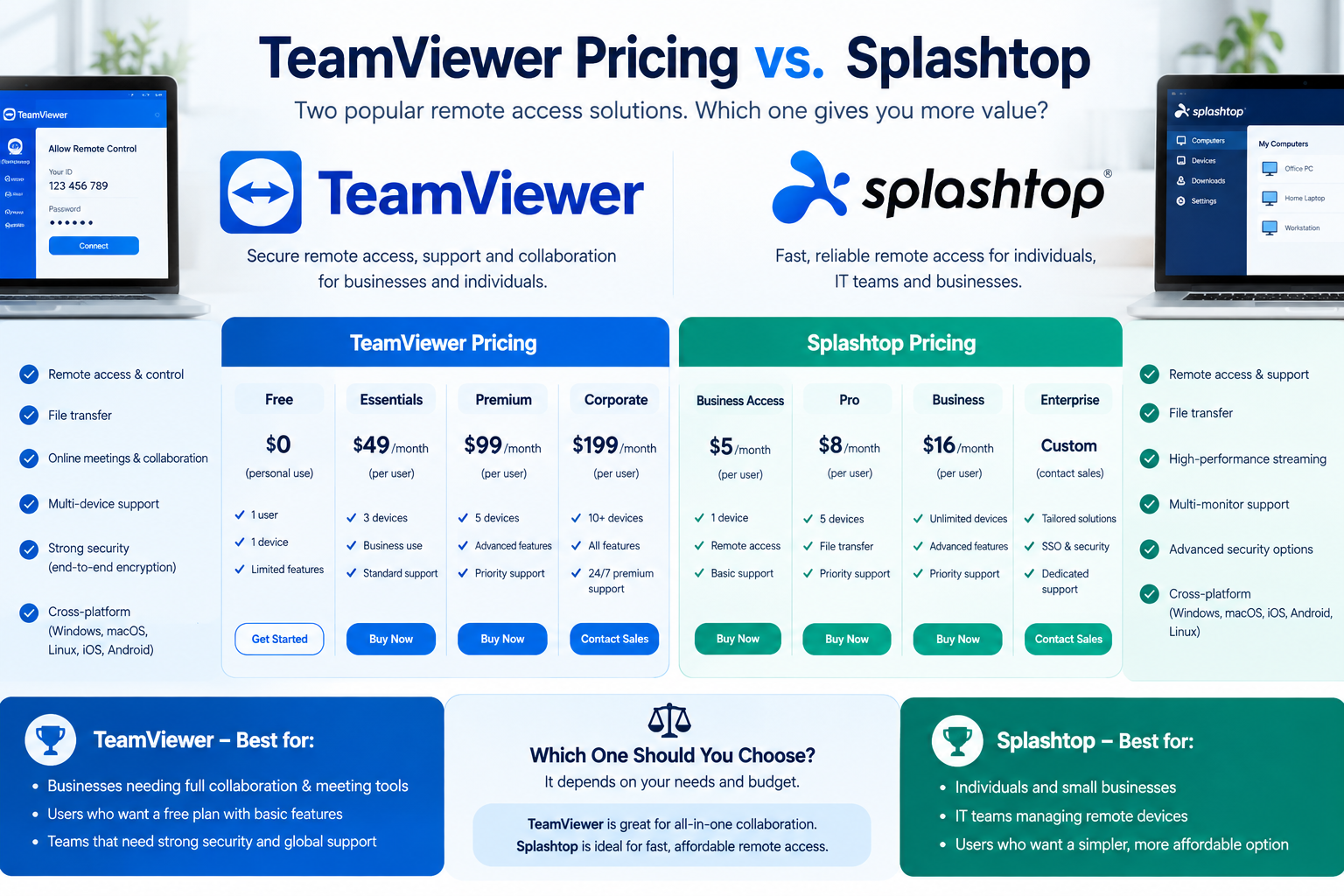
Choosing remote desktop software is about more than finding the lowest subscription price. When comparing TeamViewer Pricing vs. Splashtop, businesses need to consider licensing restrictions, remote support capabilities, security, device limits, and long-term operating costs.
Both platforms provide remote access and technical support solutions, but their pricing structures serve different priorities. TeamViewer offers an established remote connectivity ecosystem with extensive business and enterprise capabilities, while Splashtop emphasizes competitive pricing, straightforward remote access licensing, and specialized performance features.
The difference becomes especially important when several employees need access, IT technicians manage hundreds of devices, or an organization requires advanced security controls.
This guide examines official 2026 pricing, subscription tiers, licensing models, hidden expenses, and practical business scenarios to help you determine which solution offers better value.
TeamViewer Pricing vs. Splashtop: Quick Comparison
The biggest difference between the two services is their entry-level commercial pricing.
TeamViewer’s individual remote access plan starts at approximately $24.90 per month under annual billing, while Splashtop Remote Access Solo starts at $6 per month, billed annually. However, these entry-level plans do not include identical device allowances or support features.
| Comparison factor | TeamViewer | Splashtop |
|---|---|---|
| Starting commercial price | $24.90/month | $6/month |
| Entry-level annual cost | $298.80 | $72 |
| Billing structure | Annual subscription | Annual subscription |
| Free personal use | Yes, noncommercial use | Free trials; business plans paid |
| Unattended remote access | Yes | Yes |
| File transfer | Yes | Yes |
| Remote printing | Available | Available |
| Multi-monitor functionality | Plan-dependent | Available on Pro and higher |
| Remote IT support | Yes | Yes, with dedicated support plans |
| Enterprise licensing | TeamViewer Tensor | Splashtop Enterprise |
| Best fit | Broad remote support and enterprise deployments | Cost-conscious remote access and support |
Prices represent publicly advertised US starting rates as checked in October 2026. Taxes, add-ons, regional differences, discounts, and product configurations can change final costs.
Which Software Is More Affordable?
Splashtop generally offers the lower starting price for a person who needs remote access to their own computers.
For example, comparing the advertised TeamViewer Remote Access starting rate with Splashtop Solo produces an annual difference of $226.80.
That makes Splashtop’s entry-level subscription approximately 76% less expensive in this particular comparison.
However, lower cost does not automatically mean better value. An IT service provider requiring extensive attended support, advanced administration, and multiple simultaneous technicians needs to compare suitable support licenses rather than entry-level remote access plans.
TeamViewer Pricing Plans Explained for 2026
TeamViewer provides several licensing options for individuals, commercial users, IT departments, and large enterprises.
Its standard product lineup includes Remote Access, Business, Premium, and Corporate subscriptions. Larger organizations can explore TeamViewer Tensor for enterprise-level remote connectivity.
TeamViewer Remote Access
Starting price: approximately $24.90 per month, billed annually.
TeamViewer Remote Access is designed for individuals who need regular access to a limited number of remote computers.
According to TeamViewer’s licensing documentation, the standard Remote Access license supports one user and up to three designated remote devices.
Key characteristics include:
-
Unattended access to assigned computers.
-
Connections initiated from multiple devices.
-
Secure authentication and remote connectivity.
-
A single licensed user.
-
Ticket-based support rather than included telephone support.
This option is suitable for employees who routinely connect to a small collection of office or home computers.
Its biggest limitation is the number of designated remote endpoints. Someone responsible for many client computers may require a different subscription.
TeamViewer Business
Listed reference price: $50.90 per month, excluding tax.
TeamViewer Business targets individual professionals who need broader remote support capabilities.
The official TeamViewer quote page lists the Business plan with one licensed user, one concurrent connection, and 200 managed devices. Its licensing documentation also distinguishes managed devices from the wider range of endpoints that may be accessed through attended support.
Important features include:
-
Commercial remote control and assistance.
-
File transfer and session management.
-
Remote access to supported customer devices.
-
Managed-device functionality.
-
Business-oriented support capabilities.
This subscription makes more sense for independent IT consultants and technicians who regularly assist customers.
TeamViewer Premium
TeamViewer Premium is designed for teams requiring shared remote support capabilities and centralized administration.
Rather than focusing exclusively on one technician, the plan introduces multi-user licensing and collaboration features.
The official quote reference lists an allowance of up to 15 licensed users, 300 managed devices, and one concurrent connection, although current commercial offers may differ.
The distinction between licensed users and concurrent connections is critical.
A company might have several authorized technicians but only one permitted connection channel at a time. Therefore, purchasing a multi-user plan does not necessarily mean every technician can work simultaneously.
TeamViewer Corporate
TeamViewer Corporate addresses larger support departments that need increased concurrency, user management, and managed-device capacity.
The official quote reference includes:
-
Up to 30 licensed users.
-
Three concurrent connections.
-
Up to 500 managed devices.
-
Expanded administrative capabilities.
Organizations with multiple technicians should evaluate this plan against their expected peak support activity.
If five technicians routinely need separate simultaneous connections, a license providing three concurrent channels may not be sufficient.
TeamViewer Tensor
TeamViewer Tensor is the company’s enterprise remote connectivity platform.
It supports organizations requiring centralized governance, identity integration, auditability, and scalable deployment capabilities.
Potential enterprise requirements include single sign-on, advanced access management, deployment automation, and integration with existing business systems.
Tensor uses customized licensing, meaning companies generally need to request a quotation based on their deployment.
For official plan information, visit the TeamViewer pricing page.
Splashtop Pricing Plans Explained for 2026
Splashtop offers separate solutions for remote work, technical support, and enterprise IT management.
Its pricing structure is particularly attractive to individuals and small organizations that want commercial remote desktop functionality without committing to expensive multi-user support licenses.
According to the company’s official pricing page, Splashtop’s remote access subscriptions start at $72 annually, with additional plans for professional workflows and organizations.
Splashtop Remote Access Solo
Price: $6 per month, billed annually at $72.
Solo is designed for one person who needs unattended access to a limited number of computers.
The plan supports access to two remote computers and includes practical capabilities such as file transfer and remote printing.
It works particularly well for freelancers, remote employees, and small business owners accessing their primary workstations.
One important pricing detail: Splashtop increased its Solo subscription price from $5 to $6 per month effective March 1, 2026. Older comparisons quoting $60 annually are therefore outdated for new purchases and applicable renewals.
Splashtop Remote Access Pro
Price: $8.25 per user per month, billed annually at $99 per user.
Remote Access Pro expands functionality for professionals and smaller teams.
Features include:
-
Access to up to 10 remote computers per user license.
-
Multiple-monitor support.
-
Session recording.
-
Chat functionality.
-
User roles and access management.
-
Shared access capabilities for teams.
Pro offers a practical balance between affordability and functionality.
For example, a five-person company purchasing five licenses at the published base rate would spend $495 annually before taxes or applicable volume discounts.
Splashtop Remote Access Performance
Advertised price: $13 per user per month; listed annual billing amount: $149 per user.
Performance targets professionals who need advanced visual responsiveness and improved peripheral support.
Features include high-fidelity audio, 4:4:4 color accuracy, remote stylus functionality, USB passthrough, and support for high-frame-rate streaming under suitable conditions.
These capabilities are especially relevant to:
-
Graphic designers accessing powerful office workstations.
-
Video editors working with remote computers.
-
Animation and CAD professionals.
-
Creative teams requiring accurate visual output.
A small inconsistency appears in the published pricing: $13 multiplied by 12 equals $156, while Splashtop lists an annual charge of $149. Buyers should confirm the actual checkout total rather than relying solely on the displayed monthly equivalent.
Splashtop Remote Support SOS
Starting price: approximately $22 per month per concurrent technician license, billed annually.
Remote Support SOS is designed for IT professionals who troubleshoot customer and employee computers.
Unlike traditional personal remote access subscriptions, SOS supports attended assistance through session codes alongside managed unattended endpoints.
Its listed annual configurations include:
-
$259 per concurrent technician with 10 managed computers.
-
$399 per concurrent technician with 300 managed computers.
This structure can be attractive for independent support providers or organizations with a relatively small number of technicians.
However, managed endpoint capacity and concurrent technician requirements should be evaluated separately.
Splashtop Enterprise
Splashtop Enterprise provides customized licensing for larger organizations with advanced administration and security requirements.
Available enterprise capabilities include identity integration, granular access permissions, logging, API connectivity, and advanced deployment options.
Organizations can also evaluate supported on-premises configurations.
Enterprise subscriptions require customized quotations.
You can review current packages on the official Splashtop pricing page.
TeamViewer Pricing vs. Splashtop: Real Annual Cost Comparison
Monthly pricing can be misleading when business software requires annual payment.
A more useful approach is to calculate what an organization will actually spend over a complete subscription period.
| Subscription | Advertised monthly equivalent | Listed annual cost |
|---|---|---|
| TeamViewer Remote Access | $24.90 | $298.80 |
| TeamViewer Business | $50.90 | $610.80 |
| TeamViewer Premium | $112.90 | $1,354.80 |
| TeamViewer Corporate | $229.90 | $2,758.80 |
| Splashtop Solo | $6.00 | $72 |
| Splashtop Pro | $8.25 | $99/user |
| Splashtop Performance | $13.00 | $149/user |
| Splashtop Remote Support SOS | Approximately $22 | From $259/technician |
TeamViewer figures are based on the published starting rate and its official quotation reference. Splashtop figures come from official US pricing pages. These prices are reference points, not directly equivalent feature packages. Confirm any current promotional price, renewal quote, or regional charge before purchasing.
Example 1: A Freelancer Accessing Two Computers
Imagine a freelance accountant who works from a laptop but occasionally needs to access an office desktop and a second workstation.
TeamViewer Remote Access provides sufficient remote-device capacity, but Splashtop Solo also accommodates this particular requirement.
At the published starting prices:
-
TeamViewer: $298.80 annually.
-
Splashtop: $72 annually.
-
Difference: $226.80 annually.
For basic unattended access, Splashtop offers a substantial cost advantage.
Example 2: A Five-Person Remote Team
Consider a five-person business where each employee needs access to their own designated office workstation.
Five Splashtop Pro user licenses would cost $495 per year before possible volume discounts.
TeamViewer requires a closer examination of its multi-user licensing, connection channels, and device limits. A suitable TeamViewer team subscription could cost more, but its actual price and capacity must be confirmed for this specific arrangement.
The important lesson is that companies should not compare five individual user licenses against one shared team license without first checking what each allows.
Example 3: An IT Support Provider Managing 250 Computers
Now consider a technician supporting 250 managed endpoints.
Splashtop’s $399 annual SOS configuration supports up to 300 managed computers for one concurrent technician license.
TeamViewer Business lists 200 managed devices, so it would not provide the same managed-device allowance without further licensing consideration.
The correct choice depends on whether the technician requires persistent unattended access to all 250 devices, attended support, or both.
The cheapest headline subscription is not necessarily the least expensive compliant configuration.
Understanding Licensing: The Most Important Difference
One of the most overlooked factors in the TeamViewer Pricing vs. Splashtop debate is how each company defines users, devices, and connections.
These terms sound similar, but they control different parts of a remote access subscription.
Licensed Users vs. Concurrent Connections
A licensed user is a person authorized to use the software.
A concurrent connection or technician license determines how much remote support activity can occur simultaneously under a particular plan.
For example, a product might support 15 named technicians while permitting only one concurrent support connection.
If multiple technicians need simultaneous access throughout the working day, that restriction can become a costly operational bottleneck.
Attended vs. Unattended Access
Attended support usually requires a person at the remote device to initiate or approve a support session.
Unattended access enables authorized personnel to connect to a previously configured computer without someone physically accepting the connection.
Businesses supporting employees on demand may prioritize attended support.
Organizations maintaining office computers, servers, and distributed workstations often need unattended access.
Buying a personal remote access subscription for a full technical support department can therefore create licensing problems.
Managed Devices vs. Supported Devices
A managed endpoint is typically enrolled for ongoing administration or unattended access.
A supported device may instead receive occasional, temporary remote assistance.
Some plans allow unlimited on-demand support sessions across different customer devices while restricting how many computers can remain permanently managed.
Before purchasing, calculate both figures separately.
Feature Comparison: TeamViewer vs. Splashtop
Price matters, but the right software also needs to perform reliably under realistic working conditions.
Remote Access Performance
Both products support remote desktop connectivity, file transfer, and unattended access through compatible operating systems.
TeamViewer offers a broad remote connectivity environment suitable for everyday business support and complex enterprise operations.
Splashtop places particular emphasis on responsive desktop streaming and offers a dedicated Performance subscription for visually demanding work.
For standard office activities such as document editing, accounting, and administrative applications, either platform may be sufficient.
For color-sensitive graphics or specialized peripherals, Splashtop Performance deserves closer consideration.
Actual responsiveness depends on connection quality, available bandwidth, endpoint processing power, display configuration, and selected streaming settings.
Multi-Monitor Support
Remote professionals often use two or three monitors in their office environment.
Multi-monitor functionality can make a meaningful difference when someone needs simultaneous access to spreadsheets, design software, and communication tools.
TeamViewer supports multi-monitor workflows, with specific functionality depending on the subscription and environment.
Splashtop includes multi-monitor features in Pro and higher remote access plans.
Before purchasing, confirm whether your preferred package supports viewing multiple remote monitors simultaneously or only switching between displays.
Those experiences are not equivalent.
File Transfers and Remote Printing
Both platforms offer business-oriented file movement and printing features.
However, companies should test these capabilities under their actual security and operating-system policies.
For example, a remote printing function might work correctly during a standard user session but be restricted by device permissions or an organization’s endpoint configuration.
A free trial provides the best opportunity to identify these limitations.
Cross-Platform Compatibility
TeamViewer and Splashtop support common desktop operating systems and mobile client environments.
Specific capabilities can vary between Windows, macOS, Linux, Android, iOS, and browser-based access.
Mobile device screen viewing is also different from full interactive control.
Organizations supporting mobile workers should verify the exact device models, operating-system versions, and control permissions they require rather than assuming every platform provides identical functionality.
Security Comparison: Which Is Better for Businesses?
Remote access software can provide privileged access to sensitive company systems.
Consequently, security configuration is at least as important as subscription price.
Both TeamViewer and Splashtop offer encrypted remote connectivity and authentication controls, but advanced features differ by package.
Authentication and Access Controls
Businesses should prioritize multifactor authentication, individual user accounts, strong password policies, and restricted access permissions.
Avoid sharing a single administrator login among several technicians.
Individual accounts improve accountability and make it easier to revoke access when employees leave an organization.
Session Logging and Recording
Some companies need records of remote support activities for audits, internal reviews, or incident investigations.
TeamViewer provides session-related management capabilities across its commercial product range.
Splashtop Pro includes session recording, while enterprise options introduce additional administrative and logging capabilities.
Organizations should confirm recording retention periods, audit-log availability, and whether storage introduces extra charges.
Enterprise Security and Compliance
Advanced requirements may include:
-
Single sign-on integration.
-
Role-based access control.
-
IP restrictions.
-
Detailed audit records.
-
Centralized deployment policies.
-
Support for organizational compliance procedures.
TeamViewer Tensor and Splashtop Enterprise are more appropriate comparison points for these requirements than their respective entry-level subscriptions.
Neither product should be assumed to make an organization automatically compliant with HIPAA, GDPR, or other regulations.
Compliance depends on the service configuration, contractual arrangements, employee practices, and broader security program.
Hidden Costs to Consider Before Buying
Subscription prices are only one component of remote support software expenses.
The total cost of ownership may include several additional items.
1. Annual Billing Commitments
Both providers primarily advertise business subscriptions using monthly equivalents while charging annually.
TeamViewer’s subscription documentation states that its standard subscription packages are billed and renewed annually. Splashtop similarly confirms annual billing for its business subscriptions.
Check cancellation deadlines and renewal terms before committing.
2. Additional Technician Licenses
A growing IT department may need more support capacity than its original subscription includes.
Organizations should forecast how many technicians will be simultaneously active, not simply count employees.
3. Endpoint Management Add-Ons
Patch management, security monitoring, antivirus protection, and endpoint automation may be separate purchases.
Both companies offer additional management and security products.
Include these costs when comparing an entire IT operations platform.
4. Migration and Staff Training
Switching remote support providers takes effort.
IT teams may need to redeploy unattended agents, configure new access permissions, update customer documentation, and train support staff.
For organizations with hundreds of managed devices, deployment costs may outweigh short-term subscription savings.
5. Enterprise Integration Costs
SSO, service desk integrations, API capabilities, or custom reporting may require higher-priced licenses or implementation resources.
Ask vendors to identify every component required for the desired workflow.
How to Calculate the True Cost of Remote Access Software
A useful purchasing formula is:
Annual total cost = Base licenses + Additional seats or channels + Add-ons + Implementation costs + Support costs
For a longer-term comparison, include expected renewal pricing and planned business growth.
Consider this hypothetical scenario:
A small IT business purchases two Splashtop SOS technician licenses with the 300-managed-computer allowance.
At the listed $399 annual price per license, the base subscription expense would be $798 annually, before add-ons and taxes.
The business should then check whether two concurrent technician licenses and the associated endpoint capacity meet its actual requirements.
A competing TeamViewer quotation should be constructed around the same operating requirements.
Comparing subscription totals without aligning capacity is one of the most common purchasing mistakes.
TeamViewer vs. Splashtop: Pros and Cons
TeamViewer Advantages
-
Broad remote access and technical support functionality.
-
Established enterprise remote connectivity offerings.
-
Licensing options for different organizational sizes.
-
Integration possibilities across IT workflows.
-
Free usage option for qualifying personal, noncommercial use.
TeamViewer Limitations
-
Higher advertised starting prices for commercial remote access.
-
Connection channels may constrain simultaneous support work.
-
Licensing requirements can become complex.
-
Some management features require additional products or subscriptions.
Splashtop Advantages
-
Lower published entry-level remote access pricing.
-
Straightforward annual costs for individual users.
-
Specialized options for creative professionals.
-
Remote Support SOS configurations for IT technicians.
-
Dedicated enterprise access and management capabilities.
Splashtop Limitations
-
Remote Access Solo has a two-computer allowance.
-
Advanced enterprise capabilities require higher-tier licensing.
-
Creative performance features are not all included in entry-level plans.
-
Additional IT security and endpoint management tools can increase total spending.
Which Software Should You Choose?
The right answer depends primarily on your operational requirements.
| Business type | Recommended starting point | Main reason |
|---|---|---|
| Individual remote worker | Splashtop Solo | Low-cost access to two computers |
| Freelancer with several workstations | Splashtop Pro | More remote-device capacity |
| Creative professional | Splashtop Performance | Specialized visual and peripheral features |
| Independent IT technician | Splashtop SOS or TeamViewer Business | Dedicated commercial support capabilities |
| Growing help desk | Compare SOS and TeamViewer team plans | Licensing and concurrency matter |
| Large enterprise | TeamViewer Tensor or Splashtop Enterprise | Advanced administration and security |
Best for Freelancers
Splashtop Solo or Pro is often the more economical starting point.
Someone requiring access to only one or two remote computers may have little reason to purchase a more expensive support-oriented subscription.
Best for IT Technicians
The decision is more nuanced.
TeamViewer Business may appeal to technicians who prefer its tools and support environment.
Splashtop SOS may be more economical for technicians who need both attended troubleshooting and a defined number of managed endpoints.
Testing typical customer support cases is essential.
Best for Large Organizations
Enterprise buyers should request demonstrations and formal quotations from both providers.
TeamViewer Tensor and Splashtop Enterprise can meet complex remote access requirements, but the ideal solution depends on deployment architecture, compliance needs, device diversity, and existing IT integrations.
Enterprise purchase decisions should never rely solely on advertised starting prices.
Common Mistakes When Comparing TeamViewer and Splashtop
Even experienced buyers can make avoidable mistakes when choosing remote desktop software.
Comparing different license categories: A personal remote access license should not be treated as equivalent to a technician support license.
Ignoring concurrent connection limits: Ten named technicians do not necessarily mean ten simultaneous support sessions.
Overlooking renewal terms: Promotional prices and first-year costs may not reflect subsequent billing periods.
Assuming every feature is included: Remote monitoring, advanced security, and mobile support capabilities can vary considerably between tiers.
Skipping a practical trial: Remote access performance depends on the real devices and networks employees use.
A structured evaluation should test all critical workflows before purchase.
How to Test Both Platforms Before Committing
The most reliable comparison involves running a short pilot with representative users and devices.
Start by selecting a Windows workstation, a macOS device if relevant, and at least one computer located outside the corporate network.
Then test file transfer, remote printing, unattended login, multi-monitor functionality, and support-session setup.
Measure the time required to establish a connection and complete common tasks.
For IT teams, include situations such as remote rebooting, changing user permissions, reconnecting after network interruptions, and supporting devices with restricted privileges.
Document the outcomes in a simple scorecard.
| Evaluation criterion | Suggested weight |
|---|---|
| Required features | 30% |
| Security and administration | 25% |
| Total annual cost | 20% |
| Connection reliability | 15% |
| User experience and support | 10% |
These weights are an illustrative procurement framework, not vendor performance scores. Adjust them to your organization’s priorities.
Frequently Asked Questions
Is Splashtop cheaper than TeamViewer?
Yes, for basic commercial remote access, Splashtop currently advertises a substantially lower starting price.
Splashtop Solo costs $72 annually, compared with the approximately $298.80 annual starting cost referenced for TeamViewer Remote Access. Their device allowances and capabilities differ, so compare the correct plans for your needs.
Does TeamViewer offer a free version?
Yes. TeamViewer offers free access for qualifying personal, noncommercial use.
Businesses and professionals using the service for commercial purposes generally need an appropriate paid license.
Does Splashtop offer a free version?
Splashtop primarily offers paid business subscriptions with free trial opportunities.
Customers seeking ongoing commercial access should budget for the applicable subscription rather than assume a permanent free business tier.
Is Splashtop suitable for business IT support?
Yes. Splashtop Remote Support SOS is specifically designed for technicians and support teams.
It supports attended assistance and managed unattended endpoints, with allowances determined by the selected license configuration.
Can Splashtop replace TeamViewer?
For many standard remote desktop and support workflows, Splashtop may provide a practical alternative.
However, organizations should verify integration compatibility, device support, management requirements, and specialized capabilities before migration.
Which platform is better for remote work?
Splashtop is a strong option for price-sensitive remote workers, especially when only a few computers need to be accessed.
TeamViewer remains an option for users whose existing environment, operational preferences, or specific business requirements justify its subscription cost.
Are TeamViewer and Splashtop subscriptions billed monthly?
Their business pricing pages advertise monthly equivalents, but subscriptions are generally billed annually.
Customers should confirm the invoice total, renewal terms, and regional billing conditions before subscribing.
Which software is better for an enterprise?
Neither platform is universally better.
TeamViewer Tensor may suit organizations seeking its enterprise connectivity ecosystem, while Splashtop Enterprise may appeal to businesses prioritizing flexible remote access and support deployment.
A proof-of-concept evaluation provides better evidence than comparing product descriptions alone.
Final Verdict: TeamViewer Pricing vs. Splashtop in 2026
The TeamViewer Pricing vs. Splashtop comparison reveals a meaningful difference in starting subscription costs, but also highlights why licensing structure matters as much as headline pricing.
Splashtop offers compelling value for individuals, remote employees, freelancers, and budget-conscious organizations. Its lower entry-level costs and dedicated professional plans make it especially attractive when the required functionality is straightforward.
TeamViewer remains worth evaluating for commercial support operations and enterprises that value its remote connectivity ecosystem, established workflows, and administrative capabilities.
For most individual users prioritizing affordable remote access, Splashtop is the stronger starting recommendation. For organizations running complex support environments, the better choice depends on the number of technicians, managed endpoints, simultaneous sessions, required integrations, and security policies.

What Is Globalunpaid Com, and why are people searching for it? If you have recently encountered this website through Google, social media, or an unfamiliar link, you may be wondering what it offers, whether it is legitimate, and how trustworthy its information really is.
Globalunpaid.com appears to be a general-interest publishing website featuring articles about technology, business, finance, health, education, travel, and other everyday subjects. Despite its unusual name, available descriptions suggest that it operates more like an online magazine than a financial recovery service or payment platform.
However, understanding what a website publishes is only part of the story. Its credibility, editorial transparency, content quality, and security practices also matter.
This guide examines Globalunpaid.com, explains how its publishing model works, explores its potential advantages and limitations, and provides practical advice for evaluating the website safely.
What Is Globalunpaid Com?
Globalunpaid.com is a multi-topic informational website that publishes articles covering various industries, interests, and practical subjects.
Unlike specialized publications that concentrate exclusively on technology, healthcare, or personal finance, Globalunpaid.com appears to use a broader editorial approach. Its content is intended to attract readers with different information needs.
Independent reviews, including coverage from RankWithLinks and Media Clicks, describe the website as a general-interest blog rather than a debt collection platform.
Quick Overview of Globalunpaid.com
| Website detail | Available information |
|---|---|
| Website name | Globalunpaid.com |
| Website type | General-interest informational blog |
| Main purpose | Publishing articles and educational content |
| Content categories | Technology, finance, business, health, travel, education, and lifestyle |
| Target audience | General readers and online information seekers |
| Reading model | Articles appear publicly accessible |
| Domain registration | March 18, 2023, according to third-party reports |
| Financial recovery services | No reliable evidence of such services |
| Ownership transparency | Complete ownership details are not clearly established |
| Overall assessment | A broad publishing website requiring article-by-article credibility checks |
These details reflect publicly available descriptions as of October 2026. The website itself could not be independently accessed during this review, so its current functionality and editorial policies remain unverified.
Why Is Globalunpaid.com Attracting Attention?
The website’s name is one of its most distinctive characteristics.
The word “unpaid” naturally suggests missing wages, unpaid invoices, overdue accounts, or financial disputes. Someone encountering this domain might reasonably expect a service related to recovering money.
However, publicly available reviews describe a very different purpose.
An Unusual Domain Name
A website’s domain name does not always reflect its actual content.
For example, a publication may retain its original name while expanding into completely different subjects. Consequently, visitors should examine what a website currently publishes rather than make assumptions based on its address.
A Broad Range of Searchable Topics
Another possible reason for interest is the website’s varied content.
A publication covering several industries can appear in search results for unrelated questions. Someone researching technology may encounter the website just as easily as someone searching for travel tips or business information.
This approach creates multiple entry points for readers.
Questions About Website Credibility
People frequently search unfamiliar domain names before deciding whether to trust them.
Queries such as “Globalunpaid com review,” “Is Globalunpaid.com safe?” and “What does Globalunpaid.com do?” reflect a practical need to understand the identity of an unfamiliar website.
These searches do not automatically indicate that a website is dangerous. They often represent ordinary research before visiting or sharing information.
What Type of Content Does Globalunpaid.com Publish?
The website’s defining characteristic appears to be its multi-category publishing structure.
Rather than providing a single product or narrowly focused service, it brings together informational content across several subject areas.
1. Technology and Digital Information
Technology is one of the categories associated with Globalunpaid.com in independent reviews.
Topics within this category may include software, online tools, digital trends, internet services, and technology-related explanations.
Technology content can be useful for readers seeking introductory knowledge. However, software recommendations, security instructions, and technical claims should be checked against official documentation.
An article explaining a digital tool might provide helpful context, but the software developer’s official website remains the better source for installation requirements and security updates.
2. Business and Entrepreneurship
Business-related content is another reported part of the website’s publishing model.
Such material can help readers understand general business concepts, industry trends, entrepreneurship, and digital operations.
Business advice requires context, though. A strategy suitable for a small online store may not be appropriate for a manufacturing company or professional services provider.
Readers should prioritize articles that explain their assumptions, identify relevant markets, and distinguish established facts from general suggestions.
3. Finance and Personal Money Management
Financial subjects are also mentioned in descriptions of the website.
Readers may encounter information related to banking, money management, financial terminology, or broader economic topics.
Financial content deserves particular attention because inaccurate or outdated information can affect real decisions.
Before acting on financial advice, verify whether the article identifies its sources, explains applicable regulations, and provides a relevant publication or update date.
4. Health and Wellness
Health is another category associated with the platform.
General wellness articles can introduce readers to unfamiliar concepts, but they should not replace qualified medical guidance.
A trustworthy health article should distinguish between established medical evidence, preliminary research, and personal opinion.
Information about symptoms, treatment, medication, or diagnosis is best confirmed through authoritative medical sources or licensed healthcare professionals.
5. Education and Learning
Education-related content can appeal to students, professionals, and people developing new skills.
A broad informational website may be useful for understanding learning methods, career concepts, or educational terminology.
However, readers should independently confirm details about accredited qualifications, institutional recognition, admission requirements, and professional certifications.
6. Travel, Automotive, and Lifestyle
Available reviews also associate Globalunpaid.com with travel, cars, real estate, and general lifestyle topics.
These categories broaden its audience beyond business and technology readers.
Travel regulations, vehicle specifications, property laws, and prices can change frequently. Therefore, articles addressing these subjects should be treated as starting points rather than definitive current references.
How Does Globalunpaid.com Work?
To understand What Is Globalunpaid Com, it helps to examine the publishing model typically used by multi-topic websites.
The basic process is straightforward: publishers create informational articles, organize them into categories, and make them discoverable through search engines or internal navigation.
Content Discovery Through Search Engines
Many informational websites receive visitors who search for specific questions.
For example, a reader might search for an explanation of a technology concept, discover an article, and open the result.
This process allows a publication to reach people who may never have heard of its brand.
Search visibility, however, does not automatically establish accuracy or editorial authority.
Category-Based Website Navigation
Multi-topic publications commonly organize articles into separate sections.
This arrangement helps readers explore related content and allows a single website to serve different audiences.
Effective navigation should make it easy to find recent articles, identify subject categories, and return to important pages.
Article-Based Information Delivery
The main purpose of an informational publication is to answer readers’ questions.
Articles may contain explanations, examples, comparisons, tutorials, or practical suggestions.
Their actual value depends on how accurately they answer the question, whether the information is supported by evidence, and how clearly they communicate limitations.
Possible Publishing and Revenue Model
A third-party analysis by Tycoon Story describes Globalunpaid.com as a multi-niche digital publisher and reports a listing for paid publishing placements.
Such listings can indicate possible revenue opportunities through contributed or sponsored content. They do not prove the website’s precise revenue, advertising arrangements, or individual editorial decisions.
Readers should look for clear sponsorship disclosures whenever an article recommends a commercial service or product.
What Makes Globalunpaid.com Different From Specialized Websites?
The most important distinction is the website’s breadth.
A specialized publication concentrates on one industry and may develop expertise through consistent reporting, research, and experienced contributors.
A multi-topic publication attempts to address a wider variety of questions.
| Factor | Globalunpaid.com | Specialized website |
|---|---|---|
| Subject coverage | Multiple unrelated categories | One primary niche |
| Audience | Broad readership | Focused readership |
| Content approach | General informational publishing | Industry-specific coverage |
| Potential benefit | Convenient topic variety | Greater opportunity for specialized depth |
| Main limitation | Expertise may vary between subjects | Limited coverage outside its niche |
| Best use | Introductory research | Detailed subject-specific research |
Neither model is automatically superior.
A well-researched general-interest article can be more useful than a poorly written specialist article. What matters is the quality of the individual piece.
Is Globalunpaid.com Legitimate or a Scam?
One of the most important questions surrounding an unfamiliar website is whether it can be trusted.
There is not enough independently verified evidence to classify Globalunpaid.com definitively as either a scam or a fully trustworthy publication.
Available reviews consistently describe it as an informational website rather than a payment or debt-recovery service. However, those descriptions do not constitute a complete security audit.
Signs That Support Website Credibility
Readers can evaluate a website through several observable characteristics.
Useful trust indicators include:
-
Clearly identified authors and relevant professional experience.
-
An accessible About page explaining the publication’s purpose.
-
Working contact information and editorial policies.
-
Accurate articles supported by credible external references.
-
Transparent advertising or sponsored-content disclosures.
-
A privacy policy explaining how visitor information is handled.
-
Correct publication dates and meaningful content updates.
No single indicator guarantees reliability. Their combined presence provides a more useful picture.
Potential Warning Signs to Watch For
Certain behaviors deserve additional scrutiny.
Examples include requests for unnecessary personal information, unexplained payment demands, misleading advertisements, suspicious downloads, and claims of official authority without supporting evidence.
A website that asks users to reveal passwords, verification codes, or banking credentials without a legitimate reason presents a serious concern.
These are general warning signs, not confirmed allegations about Globalunpaid.com.
Does HTTPS Mean a Website Is Safe?
HTTPS encrypts information transmitted between a browser and a website when the connection is properly established.
That protection is important, but it does not establish that published claims are accurate or that the organization behind the website is trustworthy.
Fraudulent websites can also use valid HTTPS certificates.
Users should therefore evaluate both technical security and the credibility of the website’s content.
How to Check Globalunpaid.com Before Using It
Rather than relying entirely on online reviews, readers can perform several basic checks themselves.
Step 1: Confirm the Exact Website Address
Start by checking the domain carefully.
The address should match the website you intended to visit, without unexpected spelling changes, extra characters, or suspicious subdomains.
Similar-looking addresses can sometimes be used to impersonate legitimate websites.
Step 2: Examine the About and Contact Pages
Look for information identifying the publisher, editorial team, or company responsible for the website.
An About page should explain what the website does and who produces its content.
If contact information is unavailable or difficult to verify, take that limitation into account before sharing personal information.
Step 3: Review Article Quality
Open an article relevant to your interests.
Check whether the headline accurately represents the content, whether the article provides useful explanations, and whether important claims are supported by evidence.
Pay attention to factual errors, unexplained statistics, outdated details, and unsupported promises.
Step 4: Check the Website’s Reputation
Independent research can reveal additional information.
Google Safe Browsing provides a Site Status tool that allows users to check whether Google has identified certain security concerns associated with a website.
VirusTotal also provides a URL analysis tool that aggregates security-vendor assessments.
These tools are useful supplementary checks, but a clean result does not guarantee safety.
Step 5: Protect Sensitive Information
Avoid entering personal or financial information unless the website clearly needs it for a legitimate function.
For a publicly accessible article, providing bank account information, government identification numbers, or account passwords should generally be unnecessary.
Also avoid downloading unknown files or enabling browser notifications simply to read an article.
Can You Trust Information Published on Globalunpaid.com?
Trust should be evaluated at the article level rather than assigned automatically to an entire domain.
A website may publish helpful introductory explanations alongside articles that require additional verification.
Check the Author’s Expertise
The qualifications relevant to an article depend on its subject.
A general technology explanation may require practical technical knowledge, while medical advice demands appropriate healthcare expertise.
An article covering complex financial regulations should demonstrate familiarity with the relevant jurisdiction and authoritative sources.
Look for Reliable References
Credible articles should make important factual claims verifiable.
For example, healthcare claims can be compared with recognized public-health organizations, while software specifications can be checked against developer documentation.
References should directly support the claims being made rather than merely link to loosely related websites.
Understand Publication and Update Dates
A publication date is valuable, but it is not sufficient by itself.
An article about basic historical facts may remain useful for years. An article about software pricing, cybersecurity threats, or visa regulations can become outdated much more quickly.
A meaningful update should reflect actual changes to the information, not simply a revised date.
Separate Information From Promotion
Commercial content is not inherently unreliable.
However, readers should understand when a recommendation is sponsored, when a link may generate a commission, and whether relevant alternatives have been considered fairly.
Editorial transparency makes it easier to assess possible conflicts of interest.
What Are the Advantages and Limitations of Globalunpaid.com?
Based on the general publishing model described in available reviews, the website may provide certain conveniences while also presenting limitations.
Potential Advantages
-
Varied subject coverage: Readers interested in different industries may find articles within one website.
-
Accessible explanations: General-interest publishing can make unfamiliar topics easier to understand.
-
Convenient discovery: Search engines may direct readers to relevant articles without requiring prior knowledge of the publication.
-
Introductory research value: Broad articles can help establish basic concepts before more specialized research.
These benefits depend on the actual quality and accessibility of individual articles.
Potential Limitations
-
Unclear specialization: A publication covering many industries may not demonstrate equivalent expertise in every subject.
-
Limited ownership transparency: Public reviews do not establish a complete, independently verified picture of the website’s ownership.
-
Unverified editorial standards: Its current fact-checking procedures and contributor requirements have not been independently confirmed here.
-
Possible content inconsistency: Multi-author publishing can result in differences in depth, style, sourcing, and accuracy.
The most practical approach is to judge each article on its merits.
Who Should Use Globalunpaid.com?
The website’s reported content model may appeal to several reader groups.
Casual Readers
People exploring unfamiliar subjects may find general-interest publications convenient.
A broad overview can help identify important terms, introductory concepts, and questions worth researching further.
Students and Researchers
Students may use informational articles to develop an initial understanding of a topic.
However, academic assignments should rely on verifiable references, original research, and appropriately authoritative sources.
Business Professionals
Professionals researching unfamiliar business terminology or digital trends may benefit from introductory explanations.
Important financial, operational, or legal decisions still require current and reliable specialist information.
Content Creators
Writers and content researchers may examine multi-topic websites to understand how information is organized for general readers.
However, articles should not be copied or treated as authoritative merely because they appear in search results.
Original research, proper attribution, and independent fact-checking remain essential.
Is Globalunpaid.com Connected to Unpaid Wages or Debt Recovery?
Despite its name, available evidence does not identify Globalunpaid.com as an organization that recovers unpaid wages, collects debts, or resolves financial disputes.
Its reported role is primarily informational publishing.
This distinction matters because someone receiving an unexpected message containing the domain might assume that a payment problem has occurred.
A website address containing the word “unpaid” does not prove that you owe money or have an outstanding account.
If a message referencing Globalunpaid.com asks for payment, verify the sender and the alleged obligation independently.
Do not follow payment instructions solely because a message looks urgent or uses financial terminology.
What Should You Do If Globalunpaid.com Appears Unexpectedly?
Sometimes people discover unfamiliar domains through advertisements, redirects, email messages, or browser notifications.
The appropriate response depends on how the domain appeared.
If You Found It Through Google
Review the search result and determine whether the linked article relates to your original question.
You can assess the article’s content without creating an account or disclosing personal information.
If You Received a Suspicious Email
Check the sender’s address and the message’s context.
Avoid opening attachments or submitting information when the sender’s identity cannot be verified.
If the email claims to represent a bank, employer, or government agency, contact that organization through its independently verified official channel.
If You See Browser Notifications
A browser notification displaying a website’s name does not necessarily mean your device is infected.
If unwanted notifications appear, examine the browser’s website notification permissions and revoke access for unfamiliar domains.
In Chrome, for example, notification permissions can be reviewed through Settings, Privacy and security, Site settings, and Notifications.
If You Encounter an Unexpected Redirect
Close suspicious pages and avoid interacting with prompts that request downloads or immediate action.
If redirects occur repeatedly, review browser extensions, notification permissions, and device security settings.
Common Mistakes People Make When Evaluating Unfamiliar Websites
Several habits can lead to inaccurate assumptions.
One common mistake is treating a domain name as a complete description of an organization’s activities.
Another is assuming that high search rankings automatically indicate trustworthy content.
People also sometimes confuse website age with reliability. A domain may have existed for years without consistently publishing accurate information.
Similarly, a recent registration does not automatically mean that a website is fraudulent.
Perhaps the most consequential mistake is relying on one online review for a major financial, medical, or legal decision.
A stronger approach combines direct observation, independent verification, relevant subject expertise, and appropriate caution.
How Does Globalunpaid.com Compare With Authoritative Information Sources?
A general-interest publication and an official information source serve different purposes.
An introductory article may explain a complicated topic in accessible language. An authoritative institution can provide original documentation, formal guidance, or primary data.
For example, someone reading about cybersecurity could use a general article for background and then consult CISA or official software documentation for specific security guidance.
Similarly, someone researching medical subjects should prioritize qualified healthcare guidance and reputable health institutions when making decisions.
The strongest research process often involves using introductory content to understand a subject, then verifying important details against primary sources.
Frequently Asked Questions About Globalunpaid.com
What Is Globalunpaid Com in simple terms?
Globalunpaid.com appears to be a general-interest informational website covering technology, business, finance, health, travel, education, and other subjects. It resembles an online blog or magazine rather than a dedicated financial recovery platform.
Is Globalunpaid.com a legitimate website?
Publicly available reviews describe it as an informational publication. However, its current security condition, ownership details, and complete editorial practices have not been independently verified, so a definitive trustworthiness judgment would be premature.
Is Globalunpaid.com free to use?
Third-party reviews describe its articles as generally accessible without paid subscriptions. Its current access requirements should be confirmed directly on the website.
Who owns Globalunpaid.com?
Reliable publicly available information does not clearly establish the website’s complete ownership structure. Readers should consult its official About, Contact, and legal pages for current details.
Is Globalunpaid.com a debt collection agency?
No reliable evidence found in the reviewed sources identifies it as a debt collection agency. Available descriptions instead characterize it as a broad informational publication.
Does Globalunpaid.com provide online earning opportunities?
Its identity as a rewards or online earning platform is not supported by the stronger, consistent descriptions of its general-interest publishing activities. Readers should independently verify any offer promising earnings or financial rewards.
Can I trust financial or medical articles from Globalunpaid.com?
Such articles may provide introductory information, but significant claims should be verified against authoritative sources. Do not rely exclusively on an unverified general-interest article for medical treatment or financial decisions.
When was Globalunpaid.com created?
Several third-party reports identify March 18, 2023, as its domain registration date. Some reviews describe older content archives, but domain registration and article publication dates are not necessarily the same.
Can Globalunpaid.com be accessed on mobile devices?
It is a web-based publication, but its current mobile performance and compatibility were not independently verified during this review.
Should I share personal information with Globalunpaid.com?
Avoid providing unnecessary sensitive information. Before submitting any details, verify the website’s identity, the reason the information is requested, and its privacy practices.
Final Verdict: What Is Globalunpaid Com, and Is It Worth Visiting?
Understanding What Is Globalunpaid Com becomes easier once the unusual name is separated from the website’s reported purpose.
Available evidence points to a general-interest publishing platform covering multiple informational categories, including technology, business, finance, health, education, and lifestyle. There is no reliable evidence in the reviewed sources establishing it as an unpaid-wages recovery service, debt collector, or official financial institution.
Its potential value lies in offering accessible explanations across varied subjects. Nevertheless, broad coverage does not guarantee specialist expertise, and important claims should always be independently verified.
The sensible approach is to treat Globalunpaid.com as a possible starting point for research rather than an unquestionable authority.
Readers who want to explore the publication can visit Globalunpaid.com directly, examine its current articles and policies, and decide whether the information meets their needs. The website’s live availability was not confirmed during this review.
Ultimately, the best way to evaluate any unfamiliar publication is to look beyond its name and search visibility. Accuracy, evidence, transparency, and responsible handling of user information are what make online content genuinely trustworthy.


The Curious Evolution of Online Slots From Machines to Mobile Screens

imageflings.com: What It Is, Website Status, Safety, and Everything You Should Know

TeamViewer Pricing vs. Splashtop: Complete 2026 Comparison Guide
-

 Fashion9 years ago
These ’90s fashion trends are making a comeback in 2017
-
Entertainment9 years ago
The final 6 ‘Game of Thrones’ episodes might feel like a full season
-
Fashion9 years ago
According to Dior Couture, this taboo fashion accessory is back
-
Business9 years ago
Uber and Lyft are finally available in all of New York State
-
Entertainment9 years ago
The old and New Edition cast comes together to perform
-
Sports9 years ago
Steph Curry finally got the contract he deserves from the Warriors
-
Sports9 years ago
Phillies’ Aaron Altherr makes mind-boggling barehanded play
-
Business9 years ago
The 9 worst mistakes you can ever make at work
Pingback: What Is Renvoit Com