Tech
Solo Stone Molded Tech Case: Features, Uses, Pros & Buying Guide
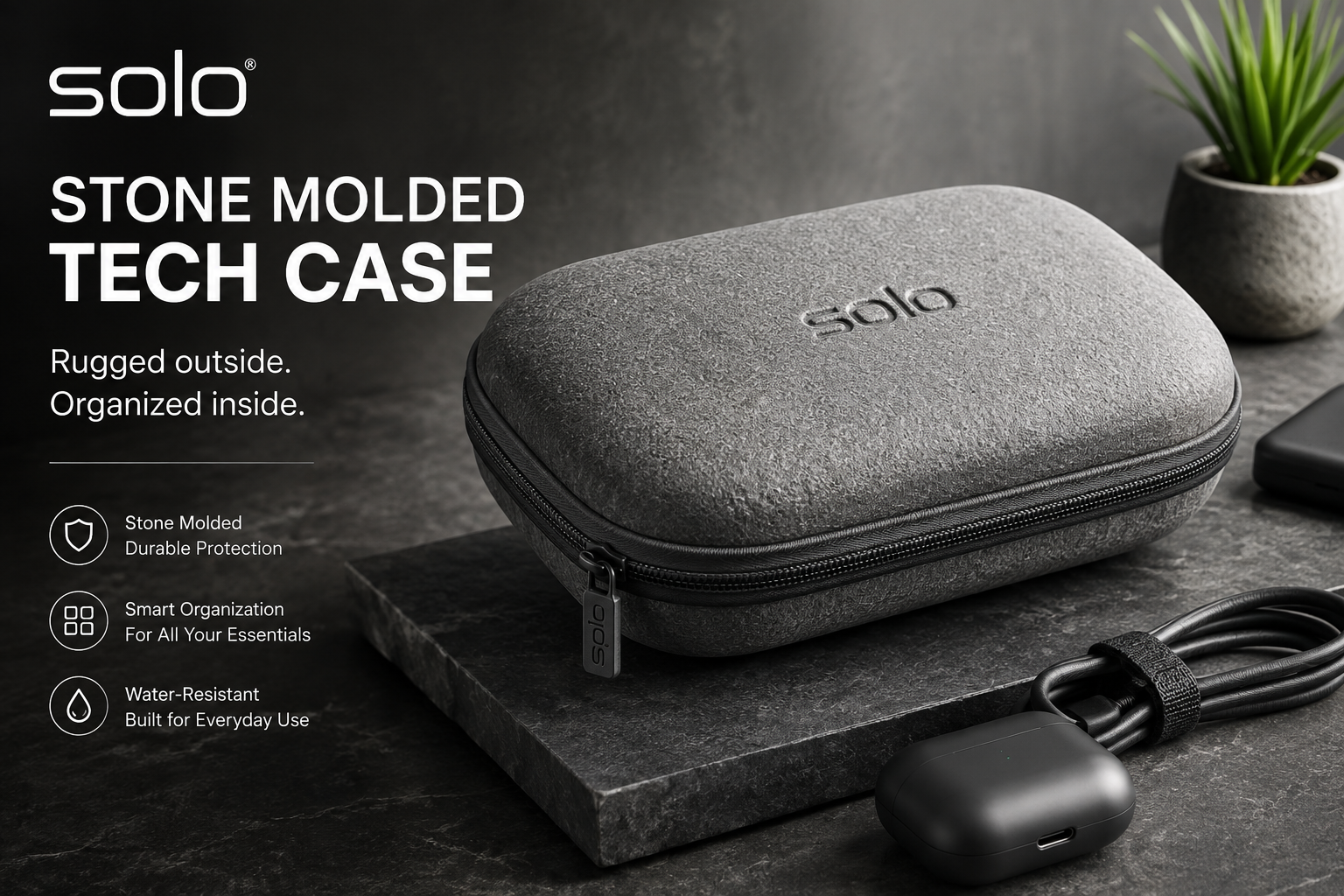
The Solo Stone Molded Tech Case is a compact electronics organizer designed for people who want cables, chargers, earbuds, adapters, and other small accessories kept together while travelling or commuting. Its molded structure, recycled PET polyester exterior, elastic cable loops, and multiple storage pockets make it more protective and organized than a basic fabric pouch.
For travellers, students, remote workers, and professionals carrying several small tech essentials, the main attraction is simple: instead of allowing loose cables and accessories to disappear inside a backpack, the case gives them a dedicated place.
This guide examines its specifications, storage layout, materials, protection, practical use cases, limitations, and the factors worth checking before buying.
Solo Stone Molded Tech Case Quick Facts
| Feature | Details |
|---|---|
| Brand | Solo New York |
| Product | Stone Molded Tech Case |
| Manufacturer model | UBN294 |
| Common retailer model | UBN294410 |
| Official body size | 5 × 7 × 3 inches |
| Weight | Approximately 0.49 lb |
| Material | Recycled PET polyester |
| Structure | Molded hard-sided case |
| Colour | Heathered gray |
| Internal organization | Slip pocket and elastic loops |
| External storage | Back air-mesh slip pocket |
| Carrying feature | Reinforced webbing handle with D-ring |
| Cleaning | Surface designed to be wiped with antibacterial wipes |
| Typical use | Cables, chargers, headphones and small tech accessories |
Solo New York currently lists the case at 5 × 7 × 3 inches, weighing approximately 0.49 lb, and constructed from recycled PET polyester.
What Is the Solo Stone Molded Tech Case?
The Solo Stone Molded Tech Case is essentially a compact hard-structured organizer for electronic accessories.
It is not intended to replace a laptop sleeve, backpack, or full electronics travel bag. Instead, its purpose is to organize the smaller items that typically create clutter inside those larger bags.
Typical contents could include:
- USB-C and Lightning cables
- Wall chargers
- Earbuds
- Small headphones
- USB drives
- Memory cards in protective holders
- Charging adapters
- Short HDMI or USB cables
- Travel adapters
- Small power accessories
- Dongles and converters
Solo describes the product as a molded, hard-sided case with internal elastic loops, an interior slip pocket, and an air-mesh pocket on the rear.
That combination makes the design particularly useful for someone who carries several small accessories but does not need a large electronics organizer.
Key Features of the Solo Stone Molded Tech Case
1. Molded Hard-Sided Construction
One of the most important differences between this case and an ordinary cable pouch is its molded structure.
The harder exterior provides additional resistance against the everyday pressure and bumps that occur when accessories are packed alongside books, laptops, clothing, or other equipment. Retail listings also describe the molded shell as helping protect accessories against everyday bumps and impacts during transportation.
It should not be confused with a rugged waterproof equipment case, however.
The Solo Stone Molded Tech Case is better understood as an everyday protective organizer rather than an industrial protective enclosure.
2. Recycled PET Polyester Exterior
Solo uses recycled PET polyester for the exterior material. The manufacturer specifically states that the heathered material is made from recycled PET bottles.
This gives the case a more conventional fabric appearance despite its molded underlying structure.
For buyers trying to reduce reliance on accessories made entirely from virgin materials, that is a meaningful additional feature.
3. Elastic Cable Loops
Loose cables are one of the biggest reasons a tech pouch becomes messy.
The interior elastic loops are intended to keep wires separated and positioned instead of allowing everything to collect at the bottom of the case.
This arrangement is especially useful for:
- Charging cables
- Short USB cables
- Earbud cables
- Adapter leads
- Watch chargers
- Small device cords
A practical approach is to assign one loop to each frequently used cable rather than filling every loop with multiple wires.
That makes frequently needed accessories easier to identify.
4. Interior Slip Pocket
The case also includes an internal slip pocket for accessories that do not fit naturally inside elastic loops.
Small flat items are likely to benefit most from this compartment.
Examples include:
- USB drives
- Card readers
- Compact adapters
- Memory-card holders
- Short extension adapters
Keeping these items separate also reduces the likelihood of them becoming buried beneath larger chargers.
5. Rear Air-Mesh Slip Pocket
A back air-mesh slip pocket adds another storage location.
This pocket may be particularly useful for accessories that need to remain immediately accessible instead of being stored inside the main compartment.
A frequently used cable or lightweight accessory could therefore be separated from the items inside the molded compartment.
6. Reinforced Webbing Handle
The manufacturer equips the case with a reinforced webbing handle and D-ring attachment.
The handle makes it easier to remove the organizer from luggage or carry it separately over a short distance.
The D-ring also gives users another potential attachment point when organizing travel gear, although the suitability of any clip or attachment will depend on its size and intended load.
7. Easy-to-Clean Surface
Travel accessories regularly come into contact with desks, airports, trains, hotel rooms, cafés, and shared workspaces.
Solo states that the case has a sanitizable surface that can be cleaned with antibacterial wipes.
For frequent travellers and commuters, that is a practical detail rather than merely a cosmetic feature.
How Much Can the Solo Stone Molded Tech Case Hold?
The official body dimensions are approximately 5 × 7 × 3 inches, so this remains a relatively compact organizer.
It should comfortably suit a modest everyday collection rather than an extensive mobile workstation.
A realistic setup might contain:
- Two or three charging cables
- One compact charging adapter
- Wireless earbuds
- One or two dongles
- USB drives or memory-card accessories
Exactly how much fits will depend heavily on charger thickness and cable size.
Large laptop power bricks, oversized travel adapters, gaming accessories, external hard drives, or several bulky chargers could consume the available space quickly.
Important Note About Product Dimensions
Buyers may notice different dimensions depending on the retailer.
Solo New York’s official product page currently gives a body size of 5 × 7 × 3 inches, whereas several office-supply listings identify the Solo Stone Molded Tech Case in their titles as approximately 2.62 × 5.25 inches.
This is a good example of why shoppers should avoid relying on a marketplace title alone.
If fit is important, use the manufacturer’s current body dimensions as the primary reference and check the specific retailer’s SKU before ordering.
Solo Stone Molded Tech Case Pros and Cons
Pros
- Molded structure offers more protection than an unstructured cable pouch.
- Elastic loops help prevent cables from becoming tangled.
- Interior and exterior pockets provide separate storage zones.
- Compact dimensions work well inside backpacks and luggage.
- Recycled PET polyester adds a sustainability-oriented material choice.
- Surface is designed for easy wipe-down cleaning.
- Reinforced handle provides convenient carrying.
- Neutral heathered gray styling suits business and casual travel.
Cons
- Interior capacity is limited compared with larger electronics organizers.
- It is not designed for laptops or tablets.
- Bulky charging bricks may occupy substantial interior space.
- The molded design is less compressible than a soft pouch.
- Shoppers may encounter inconsistent dimensions across retailer listings.
- Users carrying only one cable and charger may not need a dedicated molded case.
Solo Stone Molded Tech Case vs. a Basic Soft Tech Pouch
| Feature | Solo Stone Molded Tech Case | Basic Soft Pouch |
| Structure | Molded/hard-sided | Flexible |
| Cable organization | Elastic loops | Varies |
| Internal pocket | Yes | Varies |
| Impact resistance | Better for everyday bumps | Usually lower |
| Compressibility | Limited | High |
| Shape retention | Strong | Low to moderate |
| Best use | Organized travel tech | Minimal accessories |
| Space efficiency when empty | Lower | Higher |
The choice comes down to what matters more: structure or flexibility.
A soft pouch makes sense when saving luggage space is the priority. The Solo case becomes more attractive when accessories need to stay separated and receive some protection from surrounding items.
Who Is the Solo Stone Molded Tech Case Best For?
Frequent Travellers
Airports and hotels often require people to repeatedly unpack chargers, earbuds, and adapters.
Keeping these items inside one dedicated case reduces the need to search multiple backpack compartments.
Remote Workers
A remote worker moving between home, coworking spaces, cafés, and offices may carry the same accessory kit every day.
A molded organizer makes it easier to keep that kit ready between work sessions.
Students
Students commonly carry charging cables, earbuds, USB drives, calculators, adapters, and other small electronics alongside books and laptops.
Keeping those accessories separate from the main backpack compartment can improve organization considerably.
Business Professionals
Its understated gray design makes the case appropriate for professional environments where brightly coloured or oversized accessory organizers may feel unnecessary.
People Who Regularly Lose Small Tech Accessories
Dongles and small adapters are easy to misplace.
A dedicated compartment works best when every accessory is consistently returned to the same location after use.
Who Should Consider Something Else?
The Solo Stone Molded Tech Case will not suit every setup.
A different organizer may make more sense if you need to carry:
- Multiple laptop power supplies
- A large power bank
- Portable SSDs with protective cases
- Camera batteries and chargers
- Large international travel adapters
- Gaming controllers
- A tablet
- A laptop
- Extensive photography accessories
In these situations, a larger multi-layer electronics organizer may provide more usable capacity.
Conversely, someone carrying only one charger and one cable may be better served by a much smaller soft pouch.
How to Organize the Case Efficiently
Buying an organizer does not automatically create an organized setup. The internal space needs to be used deliberately.
Keep Cables in the Elastic Loops
Avoid piling every cable into the centre compartment.
Use the loops for the cables you access most often and coil each cable loosely enough that excessive bending is avoided.
Place Flat Accessories in the Slip Pocket
Reserve the slip pocket for smaller items that are difficult to locate inside the main compartment.
Dongles, USB drives, and memory-card holders are good candidates.
Put the Bulkiest Item in First
If you carry a wall charger, place it inside before smaller accessories.
This quickly shows how much remaining space is actually available.
Avoid Overfilling
A molded case retains its shape, so forcing oversized contents inside defeats one of its main advantages.
Excessive pressure may also place unnecessary strain on connectors, cables, and the zipper.
Build a Permanent Travel Kit
For frequent travellers, consider keeping inexpensive duplicate cables permanently inside the case.
That reduces the chance of leaving an essential charging cable at home.
Protection: What Should You Realistically Expect?
The word “molded” may create the impression of an extremely rugged protective case.
That would overstate the product.
The molded exterior is useful for protecting small accessories from routine pressure and everyday knocks inside bags. Retail product information describes it as helping shield accessories from normal bumps, drops, and impacts during travel.
It should still be treated as a consumer electronics organizer rather than a crushproof, waterproof, or military-grade equipment case.
Expensive SSDs, delicate camera equipment, or highly fragile electronics may require purpose-built protective storage.
Sustainability and Materials
The case’s recycled PET polyester is one of its more distinctive characteristics.
Solo describes the Stone collection material as being produced from recycled PET bottles, combining that material with the molded design.
That does not automatically make the entire product environmentally impact-free.
A more useful way to evaluate the sustainability angle is to consider durability as well. An organizer that remains functional for years generally represents better value than frequently replacing low-quality pouches.
Is the Solo Stone Molded Tech Case Water Resistant?
Some retailer descriptions list a water-resistant or stain-resistant coating, while the current manufacturer page emphasizes its molded construction, recycled PET material, and sanitizable exterior.
Because waterproofing and water resistance are not the same thing, buyers should not treat the case as waterproof storage.
If rain protection is essential, keep the case inside a weather-resistant backpack or another protected compartment.
Solo Stone Molded Tech Case Price
Pricing varies significantly between sellers.
At the time of research, Solo New York listed the Stone Molded Tech Case at $27.99, while third-party sellers displayed prices ranging from roughly the mid-teens to above $30 depending on stock and seller.
This makes comparison shopping worthwhile.
However, price should not be considered in isolation. Check:
- Exact model number
- Seller reputation
- Shipping cost
- Return policy
- Warranty terms
- Current stock
- Whether the item is new
A lower listed price may not be the better deal after shipping and return conditions are considered.
What to Check Before Buying
Before ordering the Solo Stone Molded Tech Case, review these five points.
1. Measure Your Largest Charger
The case may look spacious in photos, but a large laptop charger can take up much of a 5 × 7 × 3-inch organizer.
Measure the thickest item you expect to carry.
2. Count Your Cables
If you regularly carry many cables, make sure the compact format matches your needs.
A larger organizer may provide better separation.
3. Check the Model Number
Manufacturer and retailer naming conventions vary.
Look for UBN294 or retailer variants such as UBN294410 and confirm that the product images and specifications match the Stone Molded Tech Case.
4. Compare Current Seller Prices
Do not assume the manufacturer’s price is the lowest available price.
Retailer pricing and stock can differ substantially.
5. Decide Whether You Need Structure
This is arguably the most important purchasing question.
If your main priority is protecting and organizing accessories, the molded design is useful. If you primarily want a pouch that collapses when empty, a soft organizer may be more practical.
Common Buying Mistakes to Avoid
Assuming It Holds a Laptop
Despite the term “tech case,” this is an accessory organizer rather than a notebook carrying case.
Buying Based Only on Product Photos
Photos do not always communicate scale accurately.
Check the listed body measurements before purchasing.
Treating Water Resistance as Waterproofing
Do not store sensitive electronics inside expecting protection from submersion or heavy rain.
Filling Every Available Space
More accessories do not necessarily mean better organization.
Keeping a small, carefully selected travel kit usually makes the case more useful.
Ignoring Dimension Differences Between Listings
Manufacturer and reseller listings may present different measurements.
Confirm the manufacturer’s specifications and individual retailer SKU before ordering.
Frequently Asked Questions
What is the Solo Stone Molded Tech Case used for?
It is designed to organize small electronic accessories such as chargers, cables, headphones, earbuds, adapters, and similar travel tech.
What size is the Solo Stone Molded Tech Case?
Solo New York lists the official body size as approximately 5 × 7 × 3 inches.
How much does it weigh?
The manufacturer lists the weight at approximately 0.49 lb.
What material is it made from?
The case uses recycled PET polyester, with Solo stating that its heathered material is made from recycled PET bottles.
Does it have cable organizers?
Yes. Interior elastic loops are provided specifically for organizing wires and cables.
Does it have additional pockets?
Yes. It includes an interior slip pocket and a rear air-mesh slip pocket.
Is the Solo Stone Molded Tech Case hard shell?
Solo describes it as a molded hard-sided case. It provides more structure than a soft pouch but should not be confused with an industrial hard equipment case.
Can it hold a laptop charger?
A compact charger may fit, depending on its dimensions. Larger laptop power bricks could consume much of the available internal space, so measuring the charger before purchasing is recommended.
Is it suitable for air travel?
Yes, its compact format is well suited to organizing cables and accessories inside carry-on luggage or a personal bag.
Is it easy to clean?
Solo states that the surface can be cleaned using antibacterial wipes.
What colour is available?
The manufacturer’s current product page lists the Stone Molded Tech Case in gray.
Final Verdict: Is the Solo Stone Molded Tech Case Worth Buying?
The Solo Stone Molded Tech Case makes the most sense for people who regularly carry a small collection of cables, chargers, earbuds, and adapters and want something more structured than a standard fabric pouch.
Its strongest qualities are the molded construction, elastic cable loops, separate pockets, reinforced handle, easy-clean exterior, and recycled PET polyester material. The main limitation is capacity: users carrying several bulky chargers or a substantial electronics setup will likely need something larger.
For commuters, students, business travellers, and remote workers with a compact accessory kit, the Solo Stone Molded Tech Case offers a practical balance of protection, organization, portability, and understated design.

Tech
hawkecentre .com: What It Is, What You’ll Find and What to Check
If you searched for hawkecentre .com, you are probably trying to understand what the website is, what kind of content it publishes, whether it offers guest-posting or SEO opportunities, and whether you should trust the domain before interacting with it.
The website at hawkecentre.com currently operates as a broad-topic publishing platform. Its homepage features articles covering technology, business, travel, games, fashion, home improvement, education and other subjects, while its site copy also references SEO, content strategy and guest-posting services.
This guide separates what can be verified from the site’s own pages from claims made elsewhere online so you can make a more informed decision.
Quick Facts About hawkecentre .com
| Detail | What Current Sources Show |
|---|---|
| Website | hawkecentre.com |
| Main format | Multi-topic blog and article publishing website |
| Main categories | Business, technology, travel, games, fashion, home improvement, advice and education |
| Additional topics | Health, real estate, SEO and other niche subjects |
| Publishing opportunities | The site links to a “Write for Us” section and references guest-post submissions |
| SEO services | Terms and site copy mention SEO, digital marketing, content strategy and related services |
| Platform | Independent sources identify the website as WordPress-based |
| HTTPS | The domain has been reported as using a valid SSL certificate |
| Security reputation | Mixed; automated website scanners have produced conflicting assessments |
| Important distinction | It is not the official website of the Bob Hawke Prime Ministerial Centre |
What Is hawkecentre .com?
At its simplest, hawkecentre .com is a content website containing articles across a wide range of subjects.
The current homepage describes Hawkecentre as a destination for people interested in technology, food and travel, but the actual navigation is considerably broader. Categories visible on the website include business, artificial intelligence, reviews, hardware, travel, games, fashion, home improvement, advice and education.
Recent and archived articles extend beyond those core categories into subjects such as:
- Property and real estate
- Personal finance
- Cybersecurity
- Business services
- Health and wellness
- Home services
- Pet care
- Cloud computing
- SEO and digital marketing
That makes the site closer to a general-interest publishing platform than a narrowly focused specialist magazine.
Why the Site Can Be Difficult to Categorize
Hawkecentre’s positioning is not completely uniform.
Its About page describes the platform mainly as a technology-oriented resource offering articles, reviews and news, while the homepage promotes a broader food, technology and travel identity. Elsewhere, site copy describes Hawke Centre in connection with SEO and guest-posting services.
For visitors, this means it is better to judge individual sections and articles on their own merits rather than assuming every page follows one editorial niche.
What Content Can You Find on hawkecentre .com?
Technology and AI
Technology is one of the site’s most visible categories.
Its navigation includes dedicated areas for artificial intelligence, hardware and reviews, while individual articles cover subjects ranging from business IT infrastructure to cloud computing and VoIP systems.
Readers looking for technology content should still check:
- When the article was published or updated
- Whether an identifiable author is listed
- Whether technical claims link to primary sources
- Whether recommendations are editorial or promotional
- Whether product specifications remain current
Technology changes quickly, so publication date and source quality matter as much as readability.
Business and Digital Marketing
Business content is another significant part of Hawkecentre.
The site’s own terms refer to SEO, digital marketing, content strategy, web development and consulting services. Its article archive also includes business finance, property, managed IT and search-marketing topics.
This mix suggests the website serves both general readers and businesses interested in gaining online exposure.
Travel and Lifestyle
Travel appears in the main navigation, while lifestyle-related content extends into home improvement, fashion, health, pet care and property.
Because these topics can range from casual advice to decisions involving health or money, readers should distinguish between general informational articles and content requiring professional expertise.
For medical, financial or legal decisions in particular, an article should be treated as a starting point for research—not a substitute for qualified professional advice.
Is hawkecentre .com the Bob Hawke Centre Website?
No. This is an important distinction because some search results currently appear to confuse the two entities.
The Bob Hawke Prime Ministerial Centre is an Australian public-learning institution associated with Adelaide University and has an official website on the university’s adelaide.edu.au domain. Its work includes public talks, exhibitions and programs such as the Annual Hawke Lecture.
By contrast, hawkecentre.com is the multi-category publishing and SEO-related website discussed in this article.
If you are looking for lectures, exhibitions, university programs or the Bob Hawke Prime Ministerial Centre, use the official university website rather than assuming that hawkecentre.com represents that institution.
Does hawkecentre .com Accept Guest Posts?
There are strong indications that the website accepts or has accepted contributed content.
The homepage includes a “Write for Us” link, and author information appearing on multiple published articles explicitly discusses technology guest-post submissions and opportunities for content writers.
That can make the domain relevant to:
- Content marketers
- SEO agencies
- Business owners
- Freelance writers
- PR professionals
- Brands seeking editorial mentions
- Publishers looking for content partnerships
However, seeing a “Write for Us” page does not automatically make a placement valuable.
Before Submitting a Guest Post
Evaluate the opportunity beyond headline SEO metrics.
Check the following:
- Topical relevance
A link from an article closely related to your business is generally more meaningful to users than an unrelated placement. - Editorial standards
Review recent articles. Look for factual sourcing, useful information, real authorship and meaningful editing. - Existing outbound links
A website publishing excessive unrelated commercial links may offer less editorial value. - Traffic quality
Do not rely solely on third-party estimates. Look at which pages appear to receive search visibility and whether that traffic matches your target audience. - Indexation
Check whether recent articles are actually indexed in search engines. - Link attributes
If you are paying for placement, understand whether links are appropriately disclosed and tagged according to search-engine policies. - Publication permanence
Ask how long the article will remain live and whether URLs or links can later be changed.
The question is not simply, “Can I publish here?” It is, “Will publishing here genuinely help the intended audience and support my wider marketing strategy?”
Is hawkecentre .com Safe to Visit?
The available evidence is mixed, so a definitive “safe” or “unsafe” label would be misleading.
The website currently loads over HTTPS, and independent scanners have identified a valid SSL certificate. HTTPS encrypts the connection between your browser and the website, but it does not by itself prove that every page, download or transaction on a domain is trustworthy.
More importantly, automated reputation services have produced different findings.
What Independent Scanners Have Reported
PCrisk reported in an August 14, 2026 scan that 6 of 91 security engines flagged the domain and assigned a 39/100 trust score in its automated assessment. The same report also noted that results were point-in-time findings that could contain false positives or incomplete information.
ScamAdviser has presented a more favorable overall description, noting factors including an SSL certificate and several years of domain history while also highlighting limited popularity, lack of substantial independent reviews and other trust concerns.
Another automated reputation service, Gridinsoft, has previously classified the website as suspicious based on its own risk model.
What Those Results Actually Mean
Automated scanners are signals, not final verdicts.
Different services use different databases, heuristics and update schedules. A legitimate site can occasionally trigger warnings, while a valid SSL certificate can also exist on an unsafe website.
A practical approach is therefore to treat hawkecentre .com with normal web-security caution, particularly before providing sensitive information, downloading files or making payments.
A Practical Trust Checklist Before Using the Website
Before engaging with any unfamiliar publishing or marketing platform, perform a few basic checks.
1. Confirm You Are on the Correct Domain
Look carefully at the address bar.
The domain discussed here is:
hawkecentre.com
Beware of misspellings, additional words, unfamiliar subdomains or links received through unsolicited messages.
2. Check the Exact Page You Want to Use
A website’s homepage reputation does not tell you everything about an individual URL.
If you plan to submit content, purchase marketing services or download something, check that specific page rather than relying entirely on a domain-level score.
3. Verify Contact Details Independently
The Hawkecentre site currently publishes an email address and WhatsApp contact information on its contact and footer sections.
If a transaction is involved, confirm that the person responding actually represents the website and that payment instructions match previously verified communication.
4. Avoid Reusing Important Passwords
If an unfamiliar website requires account creation, use a unique password.
Never reuse the password protecting your primary email, banking account, business CMS or cloud storage.
5. Be Careful With Downloads
Reading a normal webpage carries a different risk profile from downloading executable files, browser extensions or unfamiliar archives.
Scan unexpected files before opening them.
6. Review Payment Terms First
Hawkecentre’s published terms state that invoices for certain SEO services may be required in full before work begins unless otherwise agreed. Anyone considering a paid service should therefore review the current terms, scope of work, deliverables and refund conditions before transferring money.
How to Evaluate Articles Published on Hawkecentre
A site’s authority should never be judged from its domain name alone.
For any article on Hawkecentre—or any other multi-author publishing platform—use the following quality test.
Check the Author
Ask:
- Is the writer clearly named?
- Is relevant experience provided?
- Can their expertise be independently verified?
- Have they written extensively about the subject?
An author bio is helpful, but genuine expertise should also be reflected in the accuracy and depth of the article.
Check the Evidence
Strong informational content should show where important claims come from.
This is especially important for:
- Health recommendations
- Financial guidance
- Cybersecurity advice
- Legal information
- Scientific claims
- Statistics
- Product comparisons
Primary sources, government publications, established research institutions and original manufacturer documentation are generally preferable to circular references between blogs.
Check the Date
Some advice ages faster than other advice.
A home-decor idea may remain useful for years, while software instructions, cybersecurity practices, regulations and financial figures can become outdated quickly.
Separate Information From Promotion
A useful sponsored or contributed article can still provide genuine value.
The key is transparency. Readers should be able to understand when a company, product or service is being promoted and distinguish marketing claims from independently supported facts.
Pros and Limitations of hawkecentre .com
Potential Advantages
- Covers a wide variety of topics in one place
- Maintains dedicated categories for technology and related subjects
- Publishes new material regularly
- Offers opportunities for contributed content
- Includes business and SEO-focused resources
- Provides visible contact information
- Contains a substantial archive of articles
Points to Consider
- The website covers many unrelated niches, so topical specialization varies
- Branding and positioning differ between some pages
- Some content appears commercially oriented
- External security services currently provide conflicting reputation signals
- Independent reputation data appears relatively limited
- Article quality should be assessed page by page rather than assumed from the domain
Is Hawkecentre Useful for SEO and Backlink Building?
Potentially—but backlinks should never be evaluated purely by a website’s headline authority metric.
A placement is more defensible when the article exists primarily to help readers and the reference to your website genuinely adds context or evidence.
Before pursuing a placement, examine:
- Relevance between your site and the article
- Organic visibility of the publication
- Quality of recent posts
- Indexation consistency
- Editorial review standards
- Number and quality of outbound links
- Anchor-text practices
- Whether paid links are disclosed correctly
- Whether readers are likely to gain value from the link
A smaller relevant publication can sometimes contribute more meaningful referral traffic and brand exposure than a larger but unrelated site.
Avoid building a strategy around publishing nearly identical promotional articles across dozens of unrelated websites. Sustainable SEO depends much more on useful content, genuine authority, natural citations and satisfying search intent.
Common Mistakes When Researching hawkecentre .com
Confusing It With the Official Hawke Centre
This is currently one of the easiest mistakes to make.
The general publishing website at hawkecentre.com and the Bob Hawke Prime Ministerial Centre’s official university website are separate entities.
Trusting One Third-Party Metric
Domain authority, domain rating, spam scores and automated trust ratings can all be useful signals.
None should be treated as absolute proof of quality, security or SEO value.
Buying a Placement Without Reviewing Recent Content
A domain may have old pages with strong links while its current publishing standards are completely different.
Always inspect recent posts.
Focusing Only on the Backlink
A quality contribution should make sense even without SEO benefits.
Ask whether the article introduces your business to a relevant audience, demonstrates expertise or answers a real searcher’s question.
Frequently Asked Questions About hawkecentre .com
What is hawkecentre .com?
hawkecentre .com refers to hawkecentre.com, a multi-topic article and publishing website covering areas including technology, business, travel, games, fashion, home improvement, education and other subjects. Its own pages also reference SEO and guest-posting services.
Is Hawkecentre a technology website?
Technology is a major part of the site, and its About page specifically emphasizes technology articles, reviews and news. However, the website currently publishes across numerous non-technology categories as well.
Does Hawkecentre offer guest posting?
The site includes a “Write for Us” link, and author information on published articles refers to opportunities for writers to submit guest posts. Anyone considering submission should check the latest editorial and commercial conditions directly before proceeding.
Is hawkecentre.com safe?
There is no simple answer based on the available third-party evidence. Some automated services report cautionary signals, while others provide a more favorable assessment. Users should verify current security results and exercise additional care before sharing sensitive information, downloading files or making payments.
Is hawkecentre.com connected to the Bob Hawke Prime Ministerial Centre?
The available official information does not support that conclusion. The Bob Hawke Prime Ministerial Centre operates through Adelaide University’s official web presence, while hawkecentre.com is a separate general publishing website.
Is Hawkecentre suitable for publishing business content?
The website publishes business, technology, SEO and other commercial topics, so certain subjects may fit its existing coverage. Relevance, editorial quality, disclosure requirements and audience value should still be evaluated before submitting content.
Final Thoughts on hawkecentre .com
hawkecentre .com is best understood as a broad digital publishing website rather than a single-topic specialist resource. It currently publishes content spanning technology, business, travel, property, home improvement, education and numerous other subjects while also presenting SEO and guest-posting opportunities.
For ordinary readers, the smartest approach is to evaluate each article based on its author, evidence, publication date and purpose. For marketers, guest contributors or businesses considering paid services, deeper due diligence is worthwhile—particularly because independent security and reputation tools currently provide mixed signals about the domain.
Most importantly, do not confuse the domain with the separate Bob Hawke Prime Ministerial Centre. Once that distinction is clear, visitors can assess hawkecentre .com for what it actually is: a multi-category content and marketing-oriented website whose individual pages and opportunities should be evaluated on their own quality, relevance and trust signals.
Tech
How to Create a Custom Vanity URL in WordPress
A long, complicated URL is difficult to remember, awkward to share, and rarely looks good in an email, social post, podcast, or printed marketing material. Learning how to create a vanity URL in WordPress gives you a cleaner alternative, such as yourdomain.com/offer instead of a lengthy page or tracking URL.
WordPress gives you several ways to do this. You can edit a page slug, create a redirect, use a link-management plugin, or configure a server-level redirect. The right approach depends on whether you want to change the page’s real URL or simply create a memorable shortcut to another destination.
What Is a Vanity URL?
A vanity URL is a short, branded, easy-to-remember web address created for a specific page, campaign, product, download, or external destination.
For example:
example.com/summer-sale
could redirect visitors to:
example.com/shop/special-offers/summer-2026/?utm_source=offline&utm_campaign=summer
The visitor only needs to remember the short version.
Vanity URLs are commonly used for:
- Marketing campaigns
- Affiliate links
- Social media profiles
- Podcast and video descriptions
- QR codes
- Email campaigns
- Product launches
- Lead magnets
- Event registration pages
- Long URLs containing tracking parameters
A vanity URL should not be confused with a normal WordPress permalink. WordPress defines permalinks as the permanent URLs assigned to posts, pages, archives, and other content. Its permalink settings allow site owners to choose structures such as post names or custom formats.
Vanity URL vs. WordPress Permalink
The distinction matters because changing the wrong URL can create unnecessary redirects or broken links.
| Feature | Vanity URL | WordPress Permalink |
|---|---|---|
| Main purpose | Create a memorable shortcut | Define the actual content URL |
| Example | site.com/demo |
site.com/blog/product-demo-guide/ |
| Usually redirects? | Yes | No |
| Can point externally? | Yes | Normally no |
| Useful for campaigns? | Excellent | Limited |
| Can include tracking behind it? | Yes | Possible, but less clean |
| Best for permanent page URLs? | Not usually | Yes |
If you simply want a cleaner URL for an existing page, editing its WordPress slug may be enough. If you want a short address that points somewhere else, you need a redirect or link-management solution.
How to Create a Vanity URL in WordPress
There are four practical methods. For most website owners, a redirect plugin or dedicated link-management plugin is the easiest option.
Method 1: Create a Clean URL by Editing the WordPress Slug
If the page itself should live at the shorter URL, you may not need a redirect at all.
For example, instead of:
example.com/services/our-complete-professional-seo-consulting-service/
you might use:
example.com/seo/
To do this:
- Open WordPress Dashboard → Pages or Posts.
- Edit the page you want to change.
- Locate its URL or permalink setting.
- Replace the existing slug with a short version such as
seo. - Update or publish the page.
- Open the new URL in another browser tab and verify that it loads correctly.
WordPress uses the post or page slug as part of its permalink structure, and its official documentation recommends readable URL structures that help visitors and search engines understand the content.
This method is best when the short URL should become the page’s actual permanent address.
Be Careful When Changing an Existing URL
Changing the slug of an already established page is different from creating a new vanity URL.
If the old URL has backlinks, rankings, bookmarks, or traffic, redirect it to the new address. Otherwise, visitors following the old URL may encounter a 404 error.
For a permanent URL change, Google recommends a permanent server-side redirect such as HTTP 301 or 308 when possible.
Method 2: Create a Vanity URL With Pretty Links
A dedicated link-management plugin is useful when you regularly create branded links for campaigns, affiliate destinations, resources, or external websites.
Pretty Links, for example, allows you to set a destination URL and choose a custom slug. Its documentation gives the example of turning a destination into a clean link such as yoursite.com/launch.
Step 1: Install the Plugin
From your WordPress dashboard:
Plugins → Add New Plugin
Search for Pretty Links, install it, and activate it.
Step 2: Add a New Link
Go to:
Pretty Links → Add New Link
You will need two important values:
Target URL:
The actual page visitors should reach.
Example:
https://example.com/products/software/?utm_source=youtube&utm_campaign=launch
Vanity slug:
The short path visitors will see.
Example:
software
Your finished URL becomes:
https://example.com/software
Step 3: Choose the Appropriate Redirect Type
The correct redirect depends on what the vanity link represents.
Use a permanent redirect when the vanity URL is intended to consistently point to the same permanent destination.
Use a temporary redirect when the destination may change or the redirect is only needed temporarily.
Google treats permanent and temporary redirects differently. Permanent redirects are signals that the destination should become canonical, while temporary redirects generally tell Google to retain the source URL as the primary one.
Step 4: Test the Link
Open the vanity URL in a private browser window.
Confirm that:
- It loads without an error.
- It reaches the correct destination.
- HTTPS remains enabled.
- Tracking parameters are preserved when required.
- It does not pass through unnecessary intermediate redirects.
A vanity link should feel instant. If it moves through several redirects before reaching its final destination, fix the chain.
Method 3: Create a Vanity URL With the Redirection Plugin
If you only need straightforward URL redirects and do not need advanced link-management features, the Redirection plugin is another option.
The plugin supports 301 redirects and can manage redirects without requiring you to manually edit Apache or Nginx configuration files.
Suppose you want:
example.com/book
to send visitors to:
example.com/resources/complete-wordpress-booking-guide/
After installing and activating Redirection:
- Open Tools → Redirection.
- Add
/bookas the source URL. - Enter the full destination as the target URL.
- Select the appropriate redirect behavior.
- Save the redirect.
- Test
example.com/book.
This approach works particularly well for businesses that need a small number of memorable campaign or promotional URLs without a separate link-management dashboard.
Method 4: Create a Vanity URL Without a Plugin
Advanced users can configure redirects directly at the server level.
For an Apache website, this may involve .htaccess. On Nginx, the redirect is normally added to the relevant server configuration.
Google considers server-side HTTP redirects the preferred option when permanent redirects need to communicate URL changes reliably to users and search engines.
For example, an Apache redirect could conceptually send:
/offer
directly to:
https://example.com/special-offer/
Server-level redirects have advantages because they can execute before WordPress fully loads. However, a configuration error can affect your entire website.
Use this method only if you are comfortable working with your server configuration or have access to a developer.
Which Method Should You Choose?
Your goal determines the best solution.
| Situation | Recommended Method |
|---|---|
| Creating a new short page URL | Edit the WordPress slug |
| Creating campaign shortcuts | Link-management plugin |
| Redirecting a few internal URLs | Redirection plugin |
| Managing many branded marketing links | Link-management plugin |
| High-performance server redirects | Server configuration |
| Changing an established page URL | New slug + permanent redirect |
| Hiding long tracking parameters | Vanity redirect |
For most non-technical WordPress users, a plugin-based method offers the best balance between simplicity and control.
How to Choose a Good Vanity URL
The redirect itself is only half of the job. The slug needs to be memorable.
A URL such as:
example.com/go?id=4728x
defeats much of the purpose.
A better version might be:
example.com/demo
or:
example.com/free-guide
Good vanity URLs generally share several characteristics.
Keep It Short
Use the fewest words necessary to communicate the destination.
Better:
example.com/pricing
Less memorable:
example.com/check-our-latest-pricing-options
Make the Destination Predictable
Someone seeing example.com/demo should reasonably expect a demo-related page.
Avoid misleading URLs such as:
example.com/free
when the visitor is immediately sent to a paid checkout page.
Use Real Words
Human-readable words are easier to remember and communicate verbally.
Compare:
example.com/a8x52q
with:
example.com/webinar
The second link is far easier to mention in a video, presentation, podcast, or conversation.
Prefer Lowercase Letters and Hyphens
Keep naming conventions consistent.
Examples:
example.com/seo-guide
example.com/free-trial
Consistency reduces typing errors and makes your campaign URLs easier to manage.
Should a Vanity URL Use a 301 or 302 Redirect?
This is one of the most commonly misunderstood parts of vanity URLs.
A 301 redirect generally indicates a permanent move. A 302 redirect indicates that the redirect is temporary.
Google explains that permanent redirects such as 301 and 308 are signals that the target should be treated as canonical, whereas temporary redirects such as 302 and 307 do not send the same permanent canonicalization signal.
For example, if:
example.com/services
has permanently moved to:
example.com/solutions
a permanent redirect makes sense.
But if:
example.com/weekend-sale
temporarily points to a specific promotion that will change shortly, a temporary redirect may better reflect the situation.
Do not automatically choose 301 simply because it is familiar.
Can Vanity URLs Help SEO?
A vanity URL is not an automatic ranking shortcut.
Its primary benefits are usability, branding, memorability, and campaign management. A clean URL may also be easier for people to recognize, type, and share.
The SEO value comes from implementing redirects correctly rather than from simply shortening a URL.
For permanent URL migrations, redirects help search engines understand where content has moved. Google specifically advises sending an old URL directly to its final destination and avoiding unnecessary redirect chains because chains add latency and complicate crawling.
For example, avoid:
/deal → /promotion → /products/sale → /final-offer
Prefer:
/deal → /final-offer
Vanity URLs and UTM Tracking
One particularly useful strategy is placing campaign tracking parameters inside the destination while keeping the public URL clean.
Instead of promoting:
example.com/course/?utm_source=instagram&utm_medium=social&utm_campaign=autumn_launch
you can promote:
example.com/course-offer
The vanity URL can then redirect to the full tracking URL.
This gives marketers a cleaner public-facing link without sacrificing campaign attribution.
You could also create separate vanity URLs for individual channels:
example.com/instagram
example.com/youtube
example.com/email
Each can point to the same landing page with different tracking parameters.
That makes campaign reporting easier while keeping the URLs visitors see simple.
Common Vanity URL Mistakes to Avoid
Creating Redirect Chains
Every vanity URL should ideally point directly to its final destination.
Do not keep redirecting old vanity URLs into newer vanity URLs. Google recommends keeping redirect chains low and, whenever possible, redirecting directly to the final URL.
Reusing the Same Slug
Before creating /sale, check whether a WordPress page, post, category, custom post type, or existing redirect already uses that path.
Slug conflicts can produce unexpected results.
Making URLs Too Generic
Links such as:
/go
/click
/link1
may be short, but they provide almost no context.
Prefer descriptive paths such as:
/book-demo
/pricing
/summer-sale
Changing Vanity URLs Too Often
A vanity URL becomes valuable when people remember and reuse it.
If you advertise example.com/demo across videos, printed materials, and emails, avoid changing it without a strong reason.
You can change the destination behind the vanity URL while keeping the public address consistent when that fits the campaign.
Forgetting to Test Mobile and HTTPS
Always test the completed link on both desktop and mobile.
Also confirm that it resolves to the HTTPS version of your destination and does not introduce unnecessary HTTP-to-HTTPS or www/non-www redirect hops.
Redirecting Everything to the Homepage
A vanity URL should lead to the destination users reasonably expect.
For example:
example.com/pricing
should not unexpectedly send visitors to the homepage.
Relevant destinations provide a better user experience and make campaign links easier to trust.
What Happens if Your Vanity URL Returns a 404?
First, confirm that the slug is correct.
Then check:
- Whether the redirect is enabled
- Whether another page uses the same slug
- Whether your plugin is active
- Whether the target URL is valid
- Whether WordPress rewrite rules need refreshing
WordPress notes that its permalink system depends on rewrite rules. Visiting Settings → Permalinks causes WordPress to flush those rewrite rules, which can help when a newly configured URL is not resolving correctly.
Do not repeatedly change permalink settings just to troubleshoot. First verify the redirect and slug configuration.
Can a Vanity URL Point to Another Website?
Yes.
For example:
yourdomain.com/facebook
could redirect visitors to your business’s Facebook page.
Similarly:
yourdomain.com/partner
could point to a partner landing page, and:
yourdomain.com/register
could send visitors to an external registration platform.
This can be useful because you continue sharing an address on your own branded domain even when the final destination is hosted elsewhere.
If the third-party destination changes later, you can update the redirect without replacing the public-facing vanity URL everywhere it was previously published.
Can You Create Multiple Vanity URLs for the Same Page?
Yes, and there are valid marketing reasons to do so.
Imagine the destination is:
example.com/software/free-trial/
You might create:
example.com/youtube-demo
example.com/email-demo
example.com/podcast-demo
Each vanity URL could point to the same landing page while carrying different tracking parameters.
However, do not create dozens of unnecessary variations merely for SEO. Vanity URLs are most useful when each one has a clear user or campaign purpose.
Best Practices for Managing Vanity URLs at Scale
As the number of links grows, organization becomes
SEO Title: How to Create a Vanity URL in WordPress: Easy Guide
Meta Description: Learn how to create a vanity URL in WordPress using clean slugs, redirects, and link plugins. Follow the steps, avoid SEO mistakes, and build better links.
How to Create a Vanity URL in WordPress: Easy Guide
A long, complicated URL is difficult to remember, awkward to share, and rarely looks good in an email, social post, podcast, or printed marketing material. Learning how to create a vanity URL in WordPress gives you a cleaner alternative, such as yourdomain.com/offer instead of a lengthy page or tracking URL.
WordPress gives you several ways to do this. You can edit a page slug, create a redirect, use a link-management plugin, or configure a server-level redirect. The right approach depends on whether you want to change the page’s real URL or simply create a memorable shortcut to another destination.
What Is a Vanity URL?
A vanity URL is a short, branded, easy-to-remember web address created for a specific page, campaign, product, download, or external destination.
For example:
example.com/summer-sale
could redirect visitors to:
example.com/shop/special-offers/summer-2026/?utm_source=offline&utm_campaign=summer
The visitor only needs to remember the short version.
Vanity URLs are commonly used for:
- Marketing campaigns
- Affiliate links
- Social media profiles
- Podcast and video descriptions
- QR codes
- Email campaigns
- Product launches
- Lead magnets
- Event registration pages
- Long URLs containing tracking parameters
A vanity URL should not be confused with a normal WordPress permalink. WordPress defines permalinks as the permanent URLs assigned to posts, pages, archives, and other content. Its permalink settings allow site owners to choose structures such as post names or custom formats.
Vanity URL vs. WordPress Permalink
The distinction matters because changing the wrong URL can create unnecessary redirects or broken links.
| Feature | Vanity URL | WordPress Permalink |
|---|---|---|
| Main purpose | Create a memorable shortcut | Define the actual content URL |
| Example | site.com/demo |
site.com/blog/product-demo-guide/ |
| Usually redirects? | Yes | No |
| Can point externally? | Yes | Normally no |
| Useful for campaigns? | Excellent | Limited |
| Can include tracking behind it? | Yes | Possible, but less clean |
| Best for permanent page URLs? | Not usually | Yes |
If you simply want a cleaner URL for an existing page, editing its WordPress slug may be enough. If you want a short address that points somewhere else, you need a redirect or link-management solution.
How to Create a Vanity URL in WordPress
There are four practical methods. For most website owners, a redirect plugin or dedicated link-management plugin is the easiest option.
Method 1: Create a Clean URL by Editing the WordPress Slug
If the page itself should live at the shorter URL, you may not need a redirect at all.
For example, instead of:
example.com/services/our-complete-professional-seo-consulting-service/
you might use:
example.com/seo/
To do this:
- Open WordPress Dashboard → Pages or Posts.
- Edit the page you want to change.
- Locate its URL or permalink setting.
- Replace the existing slug with a short version such as
seo. - Update or publish the page.
- Open the new URL in another browser tab and verify that it loads correctly.
WordPress uses the post or page slug as part of its permalink structure, and its official documentation recommends readable URL structures that help visitors and search engines understand the content.
This method is best when the short URL should become the page’s actual permanent address.
Be Careful When Changing an Existing URL
Changing the slug of an already established page is different from creating a new vanity URL.
If the old URL has backlinks, rankings, bookmarks, or traffic, redirect it to the new address. Otherwise, visitors following the old URL may encounter a 404 error.
For a permanent URL change, Google recommends a permanent server-side redirect such as HTTP 301 or 308 when possible.
Method 2: Create a Vanity URL With Pretty Links
A dedicated link-management plugin is useful when you regularly create branded links for campaigns, affiliate destinations, resources, or external websites.
Pretty Links, for example, allows you to set a destination URL and choose a custom slug. Its documentation gives the example of turning a destination into a clean link such as yoursite.com/launch.
Step 1: Install the Plugin
From your WordPress dashboard:
Plugins → Add New Plugin
Search for Pretty Links, install it, and activate it.
Step 2: Add a New Link
Go to:
Pretty Links → Add New Link
You will need two important values:
Target URL:
The actual page visitors should reach.
Example:
https://example.com/products/software/?utm_source=youtube&utm_campaign=launch
Vanity slug:
The short path visitors will see.
Example:
software
Your finished URL becomes:
https://example.com/software
Step 3: Choose the Appropriate Redirect Type
The correct redirect depends on what the vanity link represents.
Use a permanent redirect when the vanity URL is intended to consistently point to the same permanent destination.
Use a temporary redirect when the destination may change or the redirect is only needed temporarily.
Google treats permanent and temporary redirects differently. Permanent redirects are signals that the destination should become canonical, while temporary redirects generally tell Google to retain the source URL as the primary one.
Step 4: Test the Link
Open the vanity URL in a private browser window.
Confirm that:
- It loads without an error.
- It reaches the correct destination.
- HTTPS remains enabled.
- Tracking parameters are preserved when required.
- It does not pass through unnecessary intermediate redirects.
A vanity link should feel instant. If it moves through several redirects before reaching its final destination, fix the chain.
Method 3: Create a Vanity URL With the Redirection Plugin
If you only need straightforward URL redirects and do not need advanced link-management features, the Redirection plugin is another option.
The plugin supports 301 redirects and can manage redirects without requiring you to manually edit Apache or Nginx configuration files.
Suppose you want:
example.com/book
to send visitors to:
example.com/resources/complete-wordpress-booking-guide/
After installing and activating Redirection:
- Open Tools → Redirection.
- Add
/bookas the source URL. - Enter the full destination as the target URL.
- Select the appropriate redirect behavior.
- Save the redirect.
- Test
example.com/book.
This approach works particularly well for businesses that need a small number of memorable campaign or promotional URLs without a separate link-management dashboard.
Method 4: Create a Vanity URL Without a Plugin
Advanced users can configure redirects directly at the server level.
For an Apache website, this may involve .htaccess. On Nginx, the redirect is normally added to the relevant server configuration.
Google considers server-side HTTP redirects the preferred option when permanent redirects need to communicate URL changes reliably to users and search engines.
For example, an Apache redirect could conceptually send:
/offer
directly to:
https://example.com/special-offer/
Server-level redirects have advantages because they can execute before WordPress fully loads. However, a configuration error can affect your entire website.
Use this method only if you are comfortable working with your server configuration or have access to a developer.
Which Method Should You Choose?
Your goal determines the best solution.
| Situation | Recommended Method |
|---|---|
| Creating a new short page URL | Edit the WordPress slug |
| Creating campaign shortcuts | Link-management plugin |
| Redirecting a few internal URLs | Redirection plugin |
| Managing many branded marketing links | Link-management plugin |
| High-performance server redirects | Server configuration |
| Changing an established page URL | New slug + permanent redirect |
| Hiding long tracking parameters | Vanity redirect |
For most non-technical WordPress users, a plugin-based method offers the best balance between simplicity and control.
How to Choose a Good Vanity URL
The redirect itself is only half of the job. The slug needs to be memorable.
A URL such as:
example.com/go?id=4728x
defeats much of the purpose.
A better version might be:
example.com/demo
or:
example.com/free-guide
Good vanity URLs generally share several characteristics.
Keep It Short
Use the fewest words necessary to communicate the destination.
Better:
example.com/pricing
Less memorable:
example.com/check-our-latest-pricing-options
Make the Destination Predictable
Someone seeing example.com/demo should reasonably expect a demo-related page.
Avoid misleading URLs such as:
example.com/free
when the visitor is immediately sent to a paid checkout page.
Use Real Words
Human-readable words are easier to remember and communicate verbally.
Compare:
example.com/a8x52q
with:
example.com/webinar
The second link is far easier to mention in a video, presentation, podcast, or conversation.
Prefer Lowercase Letters and Hyphens
Keep naming conventions consistent.
Examples:
example.com/seo-guide
example.com/free-trial
Consistency reduces typing errors and makes your campaign URLs easier to manage.
Should a Vanity URL Use a 301 or 302 Redirect?
This is one of the most commonly misunderstood parts of vanity URLs.
A 301 redirect generally indicates a permanent move. A 302 redirect indicates that the redirect is temporary.
Google explains that permanent redirects such as 301 and 308 are signals that the target should be treated as canonical, whereas temporary redirects such as 302 and 307 do not send the same permanent canonicalization signal.
For example, if:
example.com/services
has permanently moved to:
example.com/solutions
a permanent redirect makes sense.
But if:
example.com/weekend-sale
temporarily points to a specific promotion that will change shortly, a temporary redirect may better reflect the situation.
Do not automatically choose 301 simply because it is familiar.
Can Vanity URLs Help SEO?
A vanity URL is not an automatic ranking shortcut.
Its primary benefits are usability, branding, memorability, and campaign management. A clean URL may also be easier for people to recognize, type, and share.
The SEO value comes from implementing redirects correctly rather than from simply shortening a URL.
For permanent URL migrations, redirects help search engines understand where content has moved. Google specifically advises sending an old URL directly to its final destination and avoiding unnecessary redirect chains because chains add latency and complicate crawling.
For example, avoid:
/deal → /promotion → /products/sale → /final-offer
Prefer:
/deal → /final-offer
Vanity URLs and UTM Tracking
One particularly useful strategy is placing campaign tracking parameters inside the destination while keeping the public URL clean.
Instead of promoting:
example.com/course/?utm_source=instagram&utm_medium=social&utm_campaign=autumn_launch
you can promote:
example.com/course-offer
The vanity URL can then redirect to the full tracking URL.
This gives marketers a cleaner public-facing link without sacrificing campaign attribution.
You could also create separate vanity URLs for individual channels:
example.com/instagram
example.com/youtube
example.com/email
Each can point to the same landing page with different tracking parameters.
That makes campaign reporting easier while keeping the URLs visitors see simple.
Common Vanity URL Mistakes to Avoid
Creating Redirect Chains
Every vanity URL should ideally point directly to its final destination.
Do not keep redirecting old vanity URLs into newer vanity URLs. Google recommends keeping redirect chains low and, whenever possible, redirecting directly to the final URL.
Reusing the Same Slug
Before creating /sale, check whether a WordPress page, post, category, custom post type, or existing redirect already uses that path.
Slug conflicts can produce unexpected results.
Making URLs Too Generic
Links such as:
/go
/click
/link1
may be short, but they provide almost no context.
Prefer descriptive paths such as:
/book-demo
/pricing
/summer-sale
Changing Vanity URLs Too Often
A vanity URL becomes valuable when people remember and reuse it.
If you advertise example.com/demo across videos, printed materials, and emails, avoid changing it without a strong reason.
You can change the destination behind the vanity URL while keeping the public address consistent when that fits the campaign.
Forgetting to Test Mobile and HTTPS
Always test the completed link on both desktop and mobile.
Also confirm that it resolves to the HTTPS version of your destination and does not introduce unnecessary HTTP-to-HTTPS or www/non-www redirect hops.
Redirecting Everything to the Homepage
A vanity URL should lead to the destination users reasonably expect.
For example:
example.com/pricing
should not unexpectedly send visitors to the homepage.
Relevant destinations provide a better user experience and make campaign links easier to trust.
What Happens if Your Vanity URL Returns a 404?
First, confirm that the slug is correct.
Then check:
- Whether the redirect is enabled
- Whether another page uses the same slug
- Whether your plugin is active
- Whether the target URL is valid
- Whether WordPress rewrite rules need refreshing
WordPress notes that its permalink system depends on rewrite rules. Visiting Settings → Permalinks causes WordPress to flush those rewrite rules, which can help when a newly configured URL is not resolving correctly.
Do not repeatedly change permalink settings just to troubleshoot. First verify the redirect and slug configuration.
Can a Vanity URL Point to Another Website?
Yes.
For example:
yourdomain.com/facebook
could redirect visitors to your business’s Facebook page.
Similarly:
yourdomain.com/partner
could point to a partner landing page, and:
yourdomain.com/register
could send visitors to an external registration platform.
This can be useful because you continue sharing an address on your own branded domain even when the final destination is hosted elsewhere.
If the third-party destination changes later, you can update the redirect without replacing the public-facing vanity URL everywhere it was previously published.
Can You Create Multiple Vanity URLs for the Same Page?
Yes, and there are valid marketing reasons to do so.
Imagine the destination is:
example.com/software/free-trial/
You might create:
example.com/youtube-demo
example.com/email-demo
example.com/podcast-demo
Each vanity URL could point to the same landing page while carrying different tracking parameters.
However, do not create dozens of unnecessary variations merely for SEO. Vanity URLs are most useful when each one has a clear user or campaign purpose.
Best Practices for Managing Vanity URLs at Scale
As the number of links grows, organization becomes important.
Maintain a simple record containing each vanity URL, its destination, campaign purpose, redirect type, owner, and creation date. For time-sensitive campaigns, also record when the link should be reviewed or retired.
Use predictable naming conventions such as:
/event-name
/product-demo
/download-guide
/campaign-offer
This prevents duplicate links and makes it easier for other team members to understand what each redirect does.
For important permanent redirects, periodically check that the destination still returns a successful response and has not itself been redirected elsewhere.
Frequently Asked Questions
What is the easiest way to create a vanity URL in WordPress?
For an existing WordPress page that simply needs a shorter permanent URL, edit the page slug. For a shortcut that should redirect somewhere else, use a redirect or link-management plugin.
Do I need a plugin to create a vanity URL?
No. You can change WordPress page slugs or configure server-level redirects manually. Plugins simply make redirect management easier for users who do not want to edit server configuration.
Can I create a vanity URL for an affiliate link?
Yes. A branded shortcut can make a long affiliate destination easier to share. Make sure your use of affiliate links still follows any applicable disclosure, advertising, and platform requirements.
Can a vanity URL contain keywords?
Yes, when they naturally describe the destination. A short path such as /wordpress-hosting is more descriptive than /link829, but adding extra keywords purely to manipulate rankings is unnecessary.
Should vanity URLs be indexed by Google?
Usually, a vanity URL used purely as a redirect does not need to become a separate indexed page. Its purpose is to route visitors to the actual destination.
Can I change where a vanity URL points later?
Yes. That flexibility is one of its main advantages. You can keep promoting the same memorable public URL while updating its destination when appropriate.
Conclusion
Understanding how to create a vanity URL in WordPress comes down to deciding whether you need a cleaner permanent page URL or a memorable redirect.
Use a customized WordPress slug when the shorter address should become the page’s real URL. Use a redirect or link-management plugin when you want branded shortcuts for campaigns, downloads, affiliate destinations, social channels, or tracked marketing links.
Whichever approach you choose, keep the vanity URL short, descriptive, and stable. Send it directly to the intended destination, use the correct redirect type, and test it before publishing. A well-managed vanity URL may look simple to the visitor, but that simplicity is exactly what makes it useful.
Maintain a simple record containing each vanity URL, its destination, campaign purpose, redirect type, owner, and creation date. For time-sensitive campaigns, also record when the link should be reviewed or retired.
Use predictable naming conventions such as:
/event-name
/product-demo
/download-guide
/campaign-offer
This prevents duplicate links and makes it easier for other team members to understand what each redirect does.
For important permanent redirects, periodically check that the destination still returns a successful response and has not itself been redirected elsewhere.
Frequently Asked Questions
What is the easiest way to create a vanity URL in WordPress?
For an existing WordPress page that simply needs a shorter permanent URL, edit the page slug. For a shortcut that should redirect somewhere else, use a redirect or link-management plugin.
Do I need a plugin to create a vanity URL?
No. You can change WordPress page slugs or configure server-level redirects manually. Plugins simply make redirect management easier for users who do not want to edit server configuration.
Can I create a vanity URL for an affiliate link?
Yes. A branded shortcut can make a long affiliate destination easier to share. Make sure your use of affiliate links still follows any applicable disclosure, advertising, and platform requirements.
Can a vanity URL contain keywords?
Yes, when they naturally describe the destination. A short path such as /wordpress-hosting is more descriptive than /link829, but adding extra keywords purely to manipulate rankings is unnecessary.
Should vanity URLs be indexed by Google?
Usually, a vanity URL used purely as a redirect does not need to become a separate indexed page. Its purpose is to route visitors to the actual destination.
Can I change where a vanity URL points later?
Yes. That flexibility is one of its main advantages. You can keep promoting the same memorable public URL while updating its destination when appropriate.
Conclusion
Understanding how to create a vanity URL in WordPress comes down to deciding whether you need a cleaner permanent page URL or a memorable redirect.
Use a customized WordPress slug when the shorter address should become the page’s real URL. Use a redirect or link-management plugin when you want branded shortcuts for campaigns, downloads, affiliate destinations, social channels, or tracked marketing links.
Whichever approach you choose, keep the vanity URL short, descriptive, and stable. Send it directly to the intended destination, use the correct redirect type, and test it before publishing. A well-managed vanity URL may look simple to the visitor, but that simplicity is exactly what makes it useful.
Tech
The WebCEO Alternative: 7 Best SEO Tools for 2026
Finding the WebCEO alternative is not simply about choosing another SEO dashboard. The right replacement should match the part of WebCEO you actually depend on—rank tracking, technical audits, competitor research, backlink analysis, client reporting, white-label features, or team collaboration.
WebCEO remains a capable agency-focused SEO platform. Its current offering includes keyword research, rank tracking, technical auditing, backlink analysis, competitor research, branded reporting, Google integrations, teamwork tools, and agency-oriented white-label functionality.
However, different platforms now go deeper in areas such as competitive intelligence, backlink data, high-volume rank tracking, AI-search visibility, or simplified SEO workflows. This guide compares the strongest alternatives so you can choose based on practical needs rather than feature count alone.
Quick Answer: What Is the Best WebCEO Alternative?
For most businesses and professional SEO teams, there is no single universal winner.
| WebCEO Alternative | Best For | Main Strength | Starting Price* |
|---|---|---|---|
| Semrush | Full-scale SEO and competitor research | Broad competitive intelligence | $139/mo |
| SE Ranking | Agencies and marketing teams | SEO + GEO tracking and daily rankings | $103.20/mo |
| Ahrefs | Backlinks and organic research | Deep search and link data | $129/mo |
| Serpstat | Budget-conscious teams | Broad toolkit at lower entry cost | $50/mo |
| AccuRanker | High-volume rank tracking | Fast, detailed ranking intelligence | $224/mo |
| Mangools | Beginners and freelancers | Simplicity and usability | Varies by plan |
| Google SEO Stack | Site owners on a tight budget | First-party performance data | Free |
*Publicly listed pricing can change. Check current limits, billing periods, add-ons, and user allowances before subscribing.
If you want an all-in-one replacement with extensive competitor research, Semrush is one of the strongest options. If agency workflows and daily keyword monitoring matter more, SE Ranking deserves serious consideration. For backlinks and organic competitor analysis, Ahrefs remains particularly strong.
Why Look for a WebCEO Alternative?
WebCEO is built with agencies and multi-site SEO management in mind. Its Agency Unlimited plan, for example, supports unlimited projects and keywords under usage-based pricing, while its platform includes branded reports and optional white-label tools on your own domain.
That does not mean it will suit every SEO workflow.
You may want an alternative because you need:
- deeper competitor and keyword datasets;
- stronger backlink research;
- more economical entry-level pricing;
- faster or more specialized rank tracking;
- easier dashboards for non-technical users;
- better AI-search or generative-engine visibility tracking;
- different API and integration options;
- simpler predictable limits for your team.
The important question is therefore not, “Which tool has more features?” It is, “Which platform removes the biggest constraint in my current SEO workflow?”
1. Semrush: Best All-in-One WebCEO Alternative
Semrush is the closest option for businesses wanting to replace WebCEO with another broad SEO ecosystem.
Its SEO toolkit combines keyword research, competitor analysis, position tracking, site audits, backlink tools, and other organic-search features. The current SEO plan supports five monitored websites and 500 tracked keywords, while Semrush has also expanded its offering to cover AI-search visibility.
Why Choose Semrush?
Semrush is particularly useful when competitor intelligence drives your SEO strategy.
You can investigate:
- competitors’ organic keywords;
- keyword gaps;
- ranking movements;
- backlink profiles;
- technical SEO problems;
- SERP competitors;
- content opportunities;
- visibility across traditional and AI-powered search.
Its advantage is not merely having many tools. The bigger benefit is being able to move from competitor discovery to keyword research, auditing and ongoing monitoring without rebuilding your workflow in several unrelated platforms.
Where Semrush May Be Less Suitable
The primary drawback is cost.
Its SEO subscription currently starts at around $139 per month when billed monthly, with higher tiers increasing substantially as project requirements grow. Additional users and separate toolkits can also add to your total spend.
Best for: Agencies, established websites, SaaS companies and marketing teams needing broad competitive intelligence.
2. SE Ranking: Best for Agencies Seeking Value
SE Ranking has evolved into much more than a basic rank tracker.
Its current Core plan includes 10 projects, 2,000 keywords, daily tracking, technical auditing and SEO/GEO research capabilities. The Growth tier increases projects, manager seats, keywords and audit allowances.
That combination makes it a particularly interesting WebCEO alternative for teams managing multiple websites.
Why SE Ranking Stands Out
It offers a useful middle ground between specialist tools and expensive enterprise SEO suites.
Common agency use cases include:
- daily keyword tracking;
- website audits;
- competitor monitoring;
- backlink research;
- keyword discovery;
- client-facing reports;
- historical performance analysis;
- AI/GEO visibility monitoring.
For agencies, daily tracking can be more practical than having enormous datasets that are only occasionally used.
Potential Limitation
SE Ranking may not be the first choice if your entire strategy depends on the deepest possible backlink or global competitive-search database.
But for teams that need a balanced platform for recurring SEO delivery, its limits can be attractive.
Best for: SEO agencies, growing teams and businesses managing several websites.
3. Ahrefs: Best for Backlinks and Organic Competitor Research
Ahrefs is a strong choice when link analysis and organic search research are central to your work.
Its current Lite plan starts at $129 per month and includes five projects, 750 tracked keywords and 100,000 monthly crawl credits. Higher plans expand historical data, tracked keywords, crawl limits and reporting capacity.
Why Choose Ahrefs Over WebCEO?
Ahrefs is particularly effective for workflows such as:
- researching competitors’ top-performing pages;
- discovering keyword opportunities;
- investigating backlinks;
- finding broken-link opportunities;
- monitoring lost and newly discovered links;
- evaluating content gaps;
- performing technical site crawls;
- analyzing historical organic performance.
For an SEO strategist, one of the most useful workflows is reverse engineering what already works for competing domains and then deciding whether the opportunity is realistically worth pursuing.
What to Consider First
Ahrefs can become expensive as your need for users, projects, tracking capacity and advanced limits increases.
Its rank tracker also uses weekly updates on the standard plans listed in its current pricing structure, which may matter to teams that require daily ranking checks as a core deliverable.
Best for: Link builders, SEO strategists, affiliate publishers and content-led businesses.
4. Serpstat: Best Lower-Cost All-in-One Option
Serpstat is worth considering when you need several professional SEO functions without immediately moving into higher-priced subscriptions.
Its Individual plan is currently listed at $50 per month and provides five projects, 100 daily searches, 10,000 keyword position checks, 30,000 audited pages and access to keyword research, domain analysis, rank tracking, backlink analysis and site auditing.
Why Serpstat Is a Practical Alternative
The platform covers many of the tasks smaller agencies and freelancers regularly perform:
- keyword research;
- website analysis;
- rank tracking;
- technical SEO audits;
- backlink research;
- batch analysis;
- scheduled reports;
- team workflows on higher plans.
The Team tier also includes API access and AI-related functionality, while its Agency plan adds white-label reports.
Where It Fits Best
Do not choose Serpstat solely because its starting price is lower.
Choose it when its actual limits match your monthly workload. A cheap subscription becomes expensive very quickly if you repeatedly need to upgrade because of search, export, audit or tracking limits.
Best for: Freelancers, smaller agencies and SEO teams looking for broad functionality at a lower entry price.
5. AccuRanker: Best WebCEO Alternative for Rank Tracking
Not every WebCEO user needs another all-in-one suite.
If ranking visibility is the primary reason you use WebCEO, a specialist platform such as AccuRanker may provide a better workflow.
AccuRanker focuses heavily on keyword and SERP monitoring, offering daily updates, local and national tracking, advanced filtering, reporting and on-demand updates. Its Professional plan currently starts at $224 per month, while plans include unlimited users.
Why AccuRanker Is Different
Its feature set is designed around answering detailed ranking questions quickly.
You can work with:
- daily ranking updates;
- keyword segmentation;
- search intent;
- SERP features;
- CTR metrics;
- Share of Voice;
- competitor performance;
- reporting and exports;
- Google Search Console and Analytics data.
AccuRanker has also expanded into LLM visibility and provides MCP connectivity that can expose authorized SEO data to compatible AI assistants.
The Trade-Off
AccuRanker is not a direct one-platform replacement for every WebCEO function.
You may still need another tool for extensive backlink analysis, technical SEO research or content discovery.
Best for: Agencies, enterprise SEO teams and businesses where ranking measurement is mission-critical.
6. Mangools: Best for Beginners and Freelancers
Many SEO platforms become unnecessarily complicated for users who only need the essentials.
Mangools takes a simpler approach. Its suite covers keyword research, SERP analysis, rank tracking, backlinks and website analysis through tools designed around relatively straightforward workflows.
Why Consider Mangools?
Its interface can be a major advantage for users who do not want a dense enterprise dashboard.
You can use it to:
- discover keyword opportunities;
- assess SERP competition;
- inspect ranking pages;
- track keyword positions;
- analyze backlinks;
- research competing websites.
Mangools also provides interactive reporting and local search support, while higher-level offerings include agency-oriented functionality such as white-label reporting.
What You Give Up
Ease of use usually means less enterprise depth.
If you need advanced team permissions, enormous datasets, extensive automation or complex client management, an agency-focused platform will probably serve you better.
Best for: Bloggers, freelancers, niche site owners and small businesses.
7. Google Search Console + GA4: Best Free Alternative Stack
A free tool does not fully reproduce WebCEO.
However, many website owners pay for SEO software before fully using the first-party data already available from Google.
A practical free stack can include:
- Google Search Console for queries, clicks, impressions and indexing;
- Google Analytics 4 for traffic and conversion behavior;
- Google Trends for demand patterns;
- Google Keyword Planner for keyword planning;
- PageSpeed Insights for performance diagnostics.
The limitation is workflow efficiency.
You do not receive the same competitor datasets, white-label reports, backlink intelligence or multi-client management environment that a paid SEO suite provides. For a single small website, however, the free stack may cover far more ground than expected.
Best for: New websites, small business owners and teams validating SEO before paying for a platform.
WebCEO vs Alternatives: Which Tool Wins by Use Case?
Choosing by brand reputation is usually a mistake. Choose according to the SEO activity that consumes the most time or creates the most business value.
| Requirement | Strong Option |
|---|---|
| Full all-in-one SEO suite | Semrush |
| Agency-focused SEO management | SE Ranking |
| Backlink analysis | Ahrefs |
| Lower-cost broad toolkit | Serpstat |
| Dedicated rank tracking | AccuRanker |
| Simple SEO workflows | Mangools |
| First-party website data | Google Search Console + GA4 |
| Competitive keyword research | Semrush / Ahrefs |
| Multiple client projects | SE Ranking / WebCEO |
| Advanced ranking segmentation | AccuRanker |
These recommendations should be treated as use-case matches, not absolute rankings. The best platform changes with your number of websites, clients, tracked keywords, users, locations and reporting requirements.
How to Choose the Right WebCEO Replacement
1. Audit What You Actually Use
Before migrating, look at your WebCEO activity for the previous few months.
Identify which features are genuinely part of your workflow.
For example:
- How many keywords do you track?
- How often do rankings need updating?
- How many sites do you manage?
- Do clients receive branded reports?
- How often do you run technical audits?
- Do you actively analyze backlinks?
- How many team members require logins?
- Do you need API access?
Buying a platform based on 50 impressive features makes little sense if your team routinely uses only five.
2. Calculate the Real Cost, Not the Advertised Price
SEO software pricing can be deceptive when compared only by the number displayed on the pricing page.
Calculate your likely monthly cost after accounting for:
- extra users;
- tracked keywords;
- projects;
- locations and devices;
- rank-check frequency;
- crawl limits;
- API usage;
- white-label functionality;
- AI visibility tracking;
- additional reports or exports.
WebCEO itself illustrates why this matters. Its Agency Unlimited plan has a base subscription but also uses separate scanning and usage charges for certain activities.
Compare total operational cost instead of entry price.
3. Test the Data You Care About
Run the same test in your final two or three platforms.
Use:
- your own domain;
- two competitors;
- 20–50 important keywords;
- several important backlinks;
- one technical crawl.
Then compare whether the tools surface materially different insights.
You are not testing which dashboard looks prettier. You are testing whether the data helps you make better SEO decisions.
4. Test Reporting Before Migrating Clients
Agency teams should treat reporting as a core feature rather than an afterthought.
Check whether you can easily explain:
- organic visibility changes;
- keyword gains and losses;
- traffic trends;
- technical improvements;
- competitor movements;
- completed work;
- opportunities for the next reporting period.
A report containing dozens of metrics but no obvious business meaning is not necessarily a good report.
Common Mistakes When Replacing WebCEO
Choosing the Tool With the Longest Feature List
Feature quantity does not equal usefulness.
A specialist rank tracker can outperform an all-in-one suite for a team whose main responsibility is SERP monitoring. Likewise, an enormous backlink index adds limited value to a local business that primarily needs technical auditing and local rank tracking.
Ignoring Data Update Frequency
This is particularly important for rank tracking.
Weekly updates may work for long-term content monitoring, while active agencies, publishers or ecommerce sites may need daily or on-demand data.
Always compare frequency alongside keyword limits.
Comparing Keyword Limits Without Locations and Devices
“1,000 tracked keywords” does not always mean 1,000 simple searches.
Tracking one keyword across several locations, search engines and devices can affect usage differently depending on the platform.
Read how each provider calculates a rank query before migrating hundreds of campaigns.
Migrating Everything at Once
Run the new system alongside WebCEO for a short transition period where practical.
Compare rankings, crawl findings, reports and integrations before moving client reporting entirely to the new platform. This reduces the risk of discovering an important limitation after historical workflows have already been disrupted.
Do You Actually Need to Leave WebCEO?
Not necessarily.
WebCEO remains especially relevant for agencies that value multi-project workflows, automated SEO tasks, team collaboration and branded or white-label reporting. Its agency product currently advertises 20+ SEO tools, extensive reporting and scalable project
SEO Title: The WebCEO Alternative: 7 Best SEO Tools for 2026
Meta Description: Looking for the WebCEO alternative? Compare Semrush, SE Ranking, Ahrefs, Serpstat, and more by pricing, features, rank tracking, and agency fit today.
The WebCEO Alternative: 7 Best SEO Tools for 2026
Finding the WebCEO alternative is not simply about choosing another SEO dashboard. The right replacement should match the part of WebCEO you actually depend on—rank tracking, technical audits, competitor research, backlink analysis, client reporting, white-label features, or team collaboration.
WebCEO remains a capable agency-focused SEO platform. Its current offering includes keyword research, rank tracking, technical auditing, backlink analysis, competitor research, branded reporting, Google integrations, teamwork tools, and agency-oriented white-label functionality.
However, different platforms now go deeper in areas such as competitive intelligence, backlink data, high-volume rank tracking, AI-search visibility, or simplified SEO workflows. This guide compares the strongest alternatives so you can choose based on practical needs rather than feature count alone.
Quick Answer: What Is the Best WebCEO Alternative?
For most businesses and professional SEO teams, there is no single universal winner.
| WebCEO Alternative | Best For | Main Strength | Starting Price* |
|---|---|---|---|
| Semrush | Full-scale SEO and competitor research | Broad competitive intelligence | $139/mo |
| SE Ranking | Agencies and marketing teams | SEO + GEO tracking and daily rankings | $103.20/mo |
| Ahrefs | Backlinks and organic research | Deep search and link data | $129/mo |
| Serpstat | Budget-conscious teams | Broad toolkit at lower entry cost | $50/mo |
| AccuRanker | High-volume rank tracking | Fast, detailed ranking intelligence | $224/mo |
| Mangools | Beginners and freelancers | Simplicity and usability | Varies by plan |
| Google SEO Stack | Site owners on a tight budget | First-party performance data | Free |
*Publicly listed pricing can change. Check current limits, billing periods, add-ons, and user allowances before subscribing.
If you want an all-in-one replacement with extensive competitor research, Semrush is one of the strongest options. If agency workflows and daily keyword monitoring matter more, SE Ranking deserves serious consideration. For backlinks and organic competitor analysis, Ahrefs remains particularly strong.
Why Look for a WebCEO Alternative?
WebCEO is built with agencies and multi-site SEO management in mind. Its Agency Unlimited plan, for example, supports unlimited projects and keywords under usage-based pricing, while its platform includes branded reports and optional white-label tools on your own domain.
That does not mean it will suit every SEO workflow.
You may want an alternative because you need:
- deeper competitor and keyword datasets;
- stronger backlink research;
- more economical entry-level pricing;
- faster or more specialized rank tracking;
- easier dashboards for non-technical users;
- better AI-search or generative-engine visibility tracking;
- different API and integration options;
- simpler predictable limits for your team.
The important question is therefore not, “Which tool has more features?” It is, “Which platform removes the biggest constraint in my current SEO workflow?”
1. Semrush: Best All-in-One WebCEO Alternative
Semrush is the closest option for businesses wanting to replace WebCEO with another broad SEO ecosystem.
Its SEO toolkit combines keyword research, competitor analysis, position tracking, site audits, backlink tools, and other organic-search features. The current SEO plan supports five monitored websites and 500 tracked keywords, while Semrush has also expanded its offering to cover AI-search visibility.
Why Choose Semrush?
Semrush is particularly useful when competitor intelligence drives your SEO strategy.
You can investigate:
- competitors’ organic keywords;
- keyword gaps;
- ranking movements;
- backlink profiles;
- technical SEO problems;
- SERP competitors;
- content opportunities;
- visibility across traditional and AI-powered search.
Its advantage is not merely having many tools. The bigger benefit is being able to move from competitor discovery to keyword research, auditing and ongoing monitoring without rebuilding your workflow in several unrelated platforms.
Where Semrush May Be Less Suitable
The primary drawback is cost.
Its SEO subscription currently starts at around $139 per month when billed monthly, with higher tiers increasing substantially as project requirements grow. Additional users and separate toolkits can also add to your total spend.
Best for: Agencies, established websites, SaaS companies and marketing teams needing broad competitive intelligence.
2. SE Ranking: Best for Agencies Seeking Value
SE Ranking has evolved into much more than a basic rank tracker.
Its current Core plan includes 10 projects, 2,000 keywords, daily tracking, technical auditing and SEO/GEO research capabilities. The Growth tier increases projects, manager seats, keywords and audit allowances.
That combination makes it a particularly interesting WebCEO alternative for teams managing multiple websites.
Why SE Ranking Stands Out
It offers a useful middle ground between specialist tools and expensive enterprise SEO suites.
Common agency use cases include:
- daily keyword tracking;
- website audits;
- competitor monitoring;
- backlink research;
- keyword discovery;
- client-facing reports;
- historical performance analysis;
- AI/GEO visibility monitoring.
For agencies, daily tracking can be more practical than having enormous datasets that are only occasionally used.
Potential Limitation
SE Ranking may not be the first choice if your entire strategy depends on the deepest possible backlink or global competitive-search database.
But for teams that need a balanced platform for recurring SEO delivery, its limits can be attractive.
Best for: SEO agencies, growing teams and businesses managing several websites.
3. Ahrefs: Best for Backlinks and Organic Competitor Research
Ahrefs is a strong choice when link analysis and organic search research are central to your work.
Its current Lite plan starts at $129 per month and includes five projects, 750 tracked keywords and 100,000 monthly crawl credits. Higher plans expand historical data, tracked keywords, crawl limits and reporting capacity.
Why Choose Ahrefs Over WebCEO?
Ahrefs is particularly effective for workflows such as:
- researching competitors’ top-performing pages;
- discovering keyword opportunities;
- investigating backlinks;
- finding broken-link opportunities;
- monitoring lost and newly discovered links;
- evaluating content gaps;
- performing technical site crawls;
- analyzing historical organic performance.
For an SEO strategist, one of the most useful workflows is reverse engineering what already works for competing domains and then deciding whether the opportunity is realistically worth pursuing.
What to Consider First
Ahrefs can become expensive as your need for users, projects, tracking capacity and advanced limits increases.
Its rank tracker also uses weekly updates on the standard plans listed in its current pricing structure, which may matter to teams that require daily ranking checks as a core deliverable.
Best for: Link builders, SEO strategists, affiliate publishers and content-led businesses.
4. Serpstat: Best Lower-Cost All-in-One Option
Serpstat is worth considering when you need several professional SEO functions without immediately moving into higher-priced subscriptions.
Its Individual plan is currently listed at $50 per month and provides five projects, 100 daily searches, 10,000 keyword position checks, 30,000 audited pages and access to keyword research, domain analysis, rank tracking, backlink analysis and site auditing.
Why Serpstat Is a Practical Alternative
The platform covers many of the tasks smaller agencies and freelancers regularly perform:
- keyword research;
- website analysis;
- rank tracking;
- technical SEO audits;
- backlink research;
- batch analysis;
- scheduled reports;
- team workflows on higher plans.
The Team tier also includes API access and AI-related functionality, while its Agency plan adds white-label reports.
Where It Fits Best
Do not choose Serpstat solely because its starting price is lower.
Choose it when its actual limits match your monthly workload. A cheap subscription becomes expensive very quickly if you repeatedly need to upgrade because of search, export, audit or tracking limits.
Best for: Freelancers, smaller agencies and SEO teams looking for broad functionality at a lower entry price.
5. AccuRanker: Best WebCEO Alternative for Rank Tracking
Not every WebCEO user needs another all-in-one suite.
If ranking visibility is the primary reason you use WebCEO, a specialist platform such as AccuRanker may provide a better workflow.
AccuRanker focuses heavily on keyword and SERP monitoring, offering daily updates, local and national tracking, advanced filtering, reporting and on-demand updates. Its Professional plan currently starts at $224 per month, while plans include unlimited users.
Why AccuRanker Is Different
Its feature set is designed around answering detailed ranking questions quickly.
You can work with:
- daily ranking updates;
- keyword segmentation;
- search intent;
- SERP features;
- CTR metrics;
- Share of Voice;
- competitor performance;
- reporting and exports;
- Google Search Console and Analytics data.
AccuRanker has also expanded into LLM visibility and provides MCP connectivity that can expose authorized SEO data to compatible AI assistants.
The Trade-Off
AccuRanker is not a direct one-platform replacement for every WebCEO function.
You may still need another tool for extensive backlink analysis, technical SEO research or content discovery.
Best for: Agencies, enterprise SEO teams and businesses where ranking measurement is mission-critical.
6. Mangools: Best for Beginners and Freelancers
Many SEO platforms become unnecessarily complicated for users who only need the essentials.
Mangools takes a simpler approach. Its suite covers keyword research, SERP analysis, rank tracking, backlinks and website analysis through tools designed around relatively straightforward workflows.
Why Consider Mangools?
Its interface can be a major advantage for users who do not want a dense enterprise dashboard.
You can use it to:
- discover keyword opportunities;
- assess SERP competition;
- inspect ranking pages;
- track keyword positions;
- analyze backlinks;
- research competing websites.
Mangools also provides interactive reporting and local search support, while higher-level offerings include agency-oriented functionality such as white-label reporting.
What You Give Up
Ease of use usually means less enterprise depth.
If you need advanced team permissions, enormous datasets, extensive automation or complex client management, an agency-focused platform will probably serve you better.
Best for: Bloggers, freelancers, niche site owners and small businesses.
7. Google Search Console + GA4: Best Free Alternative Stack
A free tool does not fully reproduce WebCEO.
However, many website owners pay for SEO software before fully using the first-party data already available from Google.
A practical free stack can include:
- Google Search Console for queries, clicks, impressions and indexing;
- Google Analytics 4 for traffic and conversion behavior;
- Google Trends for demand patterns;
- Google Keyword Planner for keyword planning;
- PageSpeed Insights for performance diagnostics.
The limitation is workflow efficiency.
You do not receive the same competitor datasets, white-label reports, backlink intelligence or multi-client management environment that a paid SEO suite provides. For a single small website, however, the free stack may cover far more ground than expected.
Best for: New websites, small business owners and teams validating SEO before paying for a platform.
WebCEO vs Alternatives: Which Tool Wins by Use Case?
Choosing by brand reputation is usually a mistake. Choose according to the SEO activity that consumes the most time or creates the most business value.
| Requirement | Strong Option |
|---|---|
| Full all-in-one SEO suite | Semrush |
| Agency-focused SEO management | SE Ranking |
| Backlink analysis | Ahrefs |
| Lower-cost broad toolkit | Serpstat |
| Dedicated rank tracking | AccuRanker |
| Simple SEO workflows | Mangools |
| First-party website data | Google Search Console + GA4 |
| Competitive keyword research | Semrush / Ahrefs |
| Multiple client projects | SE Ranking / WebCEO |
| Advanced ranking segmentation | AccuRanker |
These recommendations should be treated as use-case matches, not absolute rankings. The best platform changes with your number of websites, clients, tracked keywords, users, locations and reporting requirements.
How to Choose the Right WebCEO Replacement
1. Audit What You Actually Use
Before migrating, look at your WebCEO activity for the previous few months.
Identify which features are genuinely part of your workflow.
For example:
- How many keywords do you track?
- How often do rankings need updating?
- How many sites do you manage?
- Do clients receive branded reports?
- How often do you run technical audits?
- Do you actively analyze backlinks?
- How many team members require logins?
- Do you need API access?
Buying a platform based on 50 impressive features makes little sense if your team routinely uses only five.
2. Calculate the Real Cost, Not the Advertised Price
SEO software pricing can be deceptive when compared only by the number displayed on the pricing page.
Calculate your likely monthly cost after accounting for:
- extra users;
- tracked keywords;
- projects;
- locations and devices;
- rank-check frequency;
- crawl limits;
- API usage;
- white-label functionality;
- AI visibility tracking;
- additional reports or exports.
WebCEO itself illustrates why this matters. Its Agency Unlimited plan has a base subscription but also uses separate scanning and usage charges for certain activities.
Compare total operational cost instead of entry price.
3. Test the Data You Care About
Run the same test in your final two or three platforms.
Use:
- your own domain;
- two competitors;
- 20–50 important keywords;
- several important backlinks;
- one technical crawl.
Then compare whether the tools surface materially different insights.
You are not testing which dashboard looks prettier. You are testing whether the data helps you make better SEO decisions.
4. Test Reporting Before Migrating Clients
Agency teams should treat reporting as a core feature rather than an afterthought.
Check whether you can easily explain:
- organic visibility changes;
- keyword gains and losses;
- traffic trends;
- technical improvements;
- competitor movements;
- completed work;
- opportunities for the next reporting period.
A report containing dozens of metrics but no obvious business meaning is not necessarily a good report.
Common Mistakes When Replacing WebCEO
Choosing the Tool With the Longest Feature List
Feature quantity does not equal usefulness.
A specialist rank tracker can outperform an all-in-one suite for a team whose main responsibility is SERP monitoring. Likewise, an enormous backlink index adds limited value to a local business that primarily needs technical auditing and local rank tracking.
Ignoring Data Update Frequency
This is particularly important for rank tracking.
Weekly updates may work for long-term content monitoring, while active agencies, publishers or ecommerce sites may need daily or on-demand data.
Always compare frequency alongside keyword limits.
Comparing Keyword Limits Without Locations and Devices
“1,000 tracked keywords” does not always mean 1,000 simple searches.
Tracking one keyword across several locations, search engines and devices can affect usage differently depending on the platform.
Read how each provider calculates a rank query before migrating hundreds of campaigns.
Migrating Everything at Once
Run the new system alongside WebCEO for a short transition period where practical.
Compare rankings, crawl findings, reports and integrations before moving client reporting entirely to the new platform. This reduces the risk of discovering an important limitation after historical workflows have already been disrupted.
Do You Actually Need to Leave WebCEO?
Not necessarily.
WebCEO remains especially relevant for agencies that value multi-project workflows, automated SEO tasks, team collaboration and branded or white-label reporting. Its agency product currently advertises 20+ SEO tools, extensive reporting and scalable project management.
Switching makes more sense when another platform solves a specific limitation.
For example:
- Move toward Semrush if broader competitor intelligence is the priority.
- Consider SE Ranking for balanced agency workflows and daily tracking.
- Choose Ahrefs when backlinks and organic competitor analysis dominate your work.
- Evaluate Serpstat when budget efficiency matters.
- Use AccuRanker when rank monitoring deserves a specialist platform.
- Try Mangools when complexity is the real problem.
A migration without a clear operational benefit simply creates new work.
Frequently Asked Questions
What is the best WebCEO alternative?
Semrush is one of the strongest all-in-one alternatives for businesses wanting keyword research, competitor analysis, rank tracking, technical auditing and backlink tools in one ecosystem. SE Ranking may be a better fit for agencies prioritizing daily tracking and multi-project workflows, while Ahrefs is especially useful for backlink and organic competitor research.
Is there a free alternative to WebCEO?
There is no free platform that fully duplicates WebCEO’s agency-oriented toolkit. Google Search Console, GA4, Google Trends and PageSpeed Insights can form a useful free SEO stack, but they do not replace features such as comprehensive competitor analysis, white-label client reporting or multi-site rank tracking.
Is SE Ranking better than WebCEO?
It depends on the workflow. SE Ranking is attractive for teams wanting daily tracking, multiple projects, audits and newer GEO/AI-search functionality. WebCEO remains compelling for agencies that value its existing reporting, collaboration and white-label ecosystem.
Is Ahrefs a good replacement for WebCEO?
Yes, particularly if backlink analysis, organic competitor research and keyword discovery are major priorities. It is less of a direct replacement when your primary requirement is agency-oriented white-label project management.
Is Semrush better than WebCEO?
Semrush generally provides a broader environment for competitive research and search marketing, while WebCEO is strongly oriented toward SEO agency workflows and reporting. The better option depends on which functions your team uses daily rather than which platform has the longest feature list.
What should agencies look for in a WebCEO alternative?
Agencies should evaluate project limits, keyword allowances, rank-update frequency, additional-user fees, client access, scheduled reports, white-label options, local tracking, API access and total cost at their expected client volume.
Final Verdict: Which WebCEO Alternative Should You Choose?
The best WebCEO alternative is the platform that improves the part of your SEO operation that currently limits results.
For a broad all-in-one ecosystem, Semrush is a strong choice. SE Ranking makes sense for agencies seeking a balanced mix of daily rank tracking, auditing and multi-project management, while Ahrefs stands out for backlink and organic competitor research.
Serpstat offers an attractive lower-cost route into an all-in-one toolkit, AccuRanker is better suited to teams requiring specialist rank intelligence, and Mangools keeps the workflow manageable for freelancers and smaller businesses.
Do not migrate because another platform has more features. Compare your real projects, keyword volume, users, reporting requirements and monthly usage first. The right SEO platform is the one your team can turn into better decisions—and measurable search growth—consistently.
Switching makes more sense when another platform solves a specific limitation.
For example:
- Move toward Semrush if broader competitor intelligence is the priority.
- Consider SE Ranking for balanced agency workflows and daily tracking.
- Choose Ahrefs when backlinks and organic competitor analysis dominate your work.
- Evaluate Serpstat when budget efficiency matters.
- Use AccuRanker when rank monitoring deserves a specialist platform.
- Try Mangools when complexity is the real problem.
A migration without a clear operational benefit simply creates new work.
Frequently Asked Questions
What is the best WebCEO alternative?
Semrush is one of the strongest all-in-one alternatives for businesses wanting keyword research, competitor analysis, rank tracking, technical auditing and backlink tools in one ecosystem. SE Ranking may be a better fit for agencies prioritizing daily tracking and multi-project workflows, while Ahrefs is especially useful for backlink and organic competitor research.
Is there a free alternative to WebCEO?
There is no free platform that fully duplicates WebCEO’s agency-oriented toolkit. Google Search Console, GA4, Google Trends and PageSpeed Insights can form a useful free SEO stack, but they do not replace features such as comprehensive competitor analysis, white-label client reporting or multi-site rank tracking.
Is SE Ranking better than WebCEO?
It depends on the workflow. SE Ranking is attractive for teams wanting daily tracking, multiple projects, audits and newer GEO/AI-search functionality. WebCEO remains compelling for agencies that value its existing reporting, collaboration and white-label ecosystem.
Is Ahrefs a good replacement for WebCEO?
Yes, particularly if backlink analysis, organic competitor research and keyword discovery are major priorities. It is less of a direct replacement when your primary requirement is agency-oriented white-label project management.
Is Semrush better than WebCEO?
Semrush generally provides a broader environment for competitive research and search marketing, while WebCEO is strongly oriented toward SEO agency workflows and reporting. The better option depends on which functions your team uses daily rather than which platform has the longest feature list.
What should agencies look for in a WebCEO alternative?
Agencies should evaluate project limits, keyword allowances, rank-update frequency, additional-user fees, client access, scheduled reports, white-label options, local tracking, API access and total cost at their expected client volume.
Final Verdict: Which WebCEO Alternative Should You Choose?
The best WebCEO alternative is the platform that improves the part of your SEO operation that currently limits results.
For a broad all-in-one ecosystem, Semrush is a strong choice. SE Ranking makes sense for agencies seeking a balanced mix of daily rank tracking, auditing and multi-project management, while Ahrefs stands out for backlink and organic competitor research.
Serpstat offers an attractive lower-cost route into an all-in-one toolkit, AccuRanker is better suited to teams requiring specialist rank intelligence, and Mangools keeps the workflow manageable for freelancers and smaller businesses.
Do not migrate because another platform has more features. Compare your real projects, keyword volume, users, reporting requirements and monthly usage first. The right SEO platform is the one your team can turn into better decisions—and measurable search growth—consistently.
-
Fashion9 years agoThese ’90s fashion trends are making a comeback in 2017
-
Entertainment9 years agoThe final 6 ‘Game of Thrones’ episodes might feel like a full season
-
Fashion9 years agoAccording to Dior Couture, this taboo fashion accessory is back
-
Business9 years agoUber and Lyft are finally available in all of New York State
-
Entertainment9 years agoThe old and New Edition cast comes together to perform
-
Sports9 years agoSteph Curry finally got the contract he deserves from the Warriors
-
Sports9 years agoPhillies’ Aaron Altherr makes mind-boggling barehanded play
-
Entertainment9 years agoDisney’s live-action Aladdin finally finds its stars